9 Best Affordable Law Firm Website Design Services (2026)
Most law firm websites cost too much and still fail to bring in clients. You've probably seen quotes ranging from $3,000 to $15,000 for a site that looks fine but never shows up when someone searches for a lawyer near them. If you're comparing affordable law firm website design options right now, you're likely trying to avoid that trap while still getting a site that ranks and converts.
The good news is you don't have to choose between cheap and effective. Some providers now bundle custom design with ongoing SEO and updates for a flat monthly fee instead of a huge upfront bill, which matters if your firm has multiple offices or practice areas that each need to rank locally. Others offer DIY builders or templates if you're comfortable managing the site yourself and just need a starting point.
This list breaks down nine services worth considering in 2026, from full-service agencies to budget-friendly builders. We'll cover pricing structures , what's actually included, and which option fits firms with one location versus multi-location practices that need consistent branding and local visibility across every office. By the end, you'll know which service matches your budget and growth plans.
1. Multi Web Team
Multi Web Team built its entire model around the multi-location law firm problem, not the single-attorney website. If your firm has three offices in three cities, or you're running a growing personal injury practice with locations across a metro area, this is the service designed specifically for that setup, which sets it apart from most of the other names on this list.

What it offers
Every site starts with a custom design built for your firm's practice areas and brand, not a recycled template with your logo swapped in. From there, the subscription includes unlimited website updates , meaning your team can request new attorney bios, case results, blog posts, or seasonal promotions without a change order or an invoice showing up in your inbox. The service also handles multi-location SEO , optimizing each office's page so it can compete in local search results for its own city, while keeping the whole site under one consistent brand structure. Google's own guidance on local search ranking factors makes clear that proximity, relevance, and prominence all matter per location, and that's exactly the kind of page-by-page optimization a single generic site can't deliver on its own.
A flat monthly fee that covers design, updates, and SEO removes the guesswork most firms face when budgeting for a website.
Because the pricing is subscription-based rather than project-based, you're not stuck negotiating a new contract every time you open a location or want a design refresh. That's a meaningful difference from agencies that treat every update as a billable task.
Who it's best for
Multi Web Team fits multi-location law firms and franchise-style legal practices that need every office to show up in local search without hiring an internal marketing person to manage it. It also suits firms that are actively opening new locations and don't want to pay a new design fee every time, since the subscription model absorbs that growth. If your firm only has one office and rarely changes its content, you might not need the full package, but for firms juggling several locations, ongoing SEO management across all of them is hard to replicate with a one-time build.
Pricing
There's no large upfront design bill. Instead, you pay a flat monthly subscription that bundles design, hosting, updates, and SEO into one predictable cost. That structure matters for firms that have been burned by agencies charging separately for every small change, or by freelancers who disappear after launch.
| Cost factor | What's included |
|---|---|
| Upfront design fee | None, custom design is part of the subscription |
| Monthly subscription | Covers hosting, design, and management |
| Website updates | Unlimited, no per-change fees |
| SEO | Ongoing, location-specific optimization included |
| Contract flexibility | Scales as you add new locations |
For firms comparing total cost over two or three years, this model often ends up cheaper than a $10,000 upfront build plus hourly maintenance fees, especially once you factor in the SEO work most firms would otherwise need to hire out separately.
2. The Modern Firm
The Modern Firm has been building websites specifically for solo attorneys and small law firms for close to two decades, which gives it a longer track record than most legal marketing shops still around today. It's a solid pick if you want a legal-industry specialist rather than a general web design agency that happens to take law firm clients.
What it offers
The agency builds custom-designed websites rather than pulling from a generic template library, and every site comes with built-in content management tools so attorneys can edit text and photos without calling a developer. Packages typically include on-page SEO basics, mobile-responsive design, and integration with legal directories and review platforms, which matters since potential clients often check Avvo or Google reviews before calling. The Modern Firm also offers ongoing marketing add-ons like blog writing and pay-per-click management, though those come as separate line items rather than being bundled into one flat fee.
Specialization in one industry means fewer surprises when it comes to what attorneys actually need from a website.
Support tends to be more personal than what you'd get from a large agency, since the company has stayed relatively small and focused on legal clients specifically. That said, the site build itself is still a project-based engagement, not a subscription that automatically includes updates and SEO under one roof.
Who it's best for
This service fits solo attorneys and small firms with one or two locations who want an experienced legal-industry vendor without the size or cost of a big-name agency. It also suits firms that don't mind paying separately for marketing services beyond the initial build, since the base package focuses mainly on design and basic SEO. Firms with multiple offices that need location-specific optimization at scale will likely find the model less efficient than a subscription built around that exact problem.
Pricing
The Modern Firm doesn't publish a fixed price list, so you'll need to request a quote based on the size and complexity of your firm's site. Historically, pricing has landed in the low thousands for a custom build, with monthly hosting and maintenance plans available afterward. Ongoing SEO, content writing, and PPC management are typically quoted separately, so your total monthly cost can climb quickly if you add several services on top of the base site. That's worth factoring in if you're comparing total spend against a bundled subscription model.
3. Justia Elevate
Justia built its name on legal information and attorney directories, and Elevate is its website platform aimed at solo and small firm lawyers who want a professional site without a big design budget. It's one of the few options on this list that includes a free tier , which makes it worth a look if you're just starting out or testing whether a dedicated legal website even moves the needle for your practice.
What it offers
Justia Elevate gives you a template-based website built specifically for law firms, with layouts organized around practice areas, attorney bios, and contact forms that are already set up to capture leads. The platform includes basic SEO tools, a blog function, and integration with the Justia legal directory, so your firm shows up both on your own site and inside Justia's network of attorney listings. Paid tiers add more design flexibility, additional pages, and stronger on-page SEO controls, though you're still working within Justia's template system rather than getting a fully custom build.
A free website tier can work as a starting point, but most firms outgrow it once they need real design flexibility or deeper SEO control.
Hosting, security updates, and basic maintenance are handled by Justia on every tier, which removes some of the technical burden compared to a fully DIY builder. That said, content updates like new blog posts or bio changes are still on you to make, since there's no ongoing content team behind the subscription.
Who it's best for
Elevate fits solo attorneys and very small firms who want a functional, professional-looking site without spending money upfront, especially if you're comfortable managing your own updates. It also suits lawyers who already rely on legal directories for lead generation and want their website tied into that same ecosystem. Firms with multiple offices or complex practice areas will likely find the template system too limiting for the kind of location-specific pages that multi-location SEO requires.
Pricing
Justia offers a free plan with basic features, plus paid tiers that unlock more design options, additional pages, and stronger SEO tools. Paid plans generally run in the range of a low monthly subscription rather than a large upfront project fee, which keeps the barrier to entry low. There's no bundled content writing or ongoing marketing management included, so budget separately if you want blog content or PPC campaigns layered on top.
4. LawLytics
LawLytics has built a niche around teaching attorneys how to manage their own marketing rather than just handing over a finished site and disappearing. The platform combines a website builder with a marketing philosophy built around content and search visibility, which makes it a fit for solo practitioners who want to stay hands-on with their own legal marketing instead of outsourcing every decision.
What it offers
LawLytics gives you a content management system designed specifically for law firms, with built-in tools for publishing articles, tracking which pages bring in leads, and adjusting on-page SEO without needing a developer. The platform leans heavily on education, offering webinars, guides, and coaching on how to write content that actually ranks, rather than just installing a template and calling it done. You also get analytics dashboards that show which pages convert visitors into calls or form submissions, which helps you figure out where to focus your writing time. Design customization is more limited than a fully custom build, but the platform gives you enough flexibility to adjust layout, colors, and page structure without touching code.
A website builder built around teaching you SEO works well if you're willing to write the content yourself, but it shifts the workload onto your schedule instead of a vendor's.
Support comes through LawLytics' own team rather than a large agency staff, and the company markets itself as a long-term partner rather than a one-time vendor. That fits attorneys who want ongoing guidance without paying for a full-service marketing team.
Who it's best for
LawLytics suits solo attorneys and small firms who want to actively manage their own content strategy and don't mind spending time writing blog posts or practice area pages themselves. It also fits lawyers who value education and want to understand the reasoning behind SEO decisions rather than just trusting a vendor to handle it silently. Firms with multiple locations or limited time to write ongoing content will likely find the DIY structure harder to sustain, since the platform's value depends heavily on how much effort you put into it.
Pricing
LawLytics charges a monthly subscription that covers hosting, the CMS platform, and access to its training resources, with pricing typically landing in the low hundreds per month. There's no large upfront design fee, but the ongoing cost assumes you're doing much of the content work yourself rather than paying someone else to write it. Add-on coaching or consulting services are available separately if you want more direct guidance beyond the self-serve materials.
5. iLawyerMarketing
iLawyerMarketing positions itself as a full-service digital marketing agency that happens to specialize in law firms, rather than a website builder with marketing bolted on. Attorneys who need video content, aggressive SEO campaigns, and a website that supports a bigger marketing push often land here after outgrowing a simpler builder.

What it offers
Sites from iLawyerMarketing come with custom web design built around conversion, meaning every page is structured to move a visitor toward a call or a form submission rather than just looking polished. The agency is known for producing attorney video content , which it weaves into homepages and practice area pages to build trust faster than text alone. Beyond the build itself, packages typically bundle:
- Search engine optimization tied to specific practice areas
- Pay-per-click campaign management
- Video production and editing
- Reputation management across review platforms
Video-heavy design works well for firms that want to stand out, but it usually comes with an agency-level price tag to match.
Ongoing management is available, but it's structured more like a traditional marketing retainer than a flat all-inclusive subscription, so your monthly cost depends on which services you add beyond the base site.
Who it's best for
iLawyerMarketing suits established firms with a real marketing budget who want an agency handling design, SEO, and paid advertising under one roof rather than piecing services together from different vendors. It also fits firms that want video as a core part of their brand and don't mind paying for the production quality that requires. Solo attorneys or firms still watching every dollar will likely find the pricing steeper than the DIY or subscription options elsewhere on this list, and multi-location firms may need to negotiate custom scopes for each office rather than getting per-location optimization built in by default.
Pricing
Pricing isn't published, and quotes vary widely depending on which services you bundle together. Historically, custom design projects have started in the mid to high thousands, with monthly retainers for SEO or PPC management adding several hundred to a few thousand dollars more depending on scope. That combination can make iLawyerMarketing one of the pricier names on this list for firms searching for affordable law firm website design , even though the quality of the output tends to reflect the higher cost.
6. PaperStreet
PaperStreet has spent over two decades designing websites almost exclusively for law firms, and its portfolio leans toward polished, design-forward sites for firms that want to look like a bigger operation than they actually are. It's a name that comes up often when attorneys ask peers for recommendations, which says something about its reputation even if it doesn't make it the cheapest option here.
What it offers
PaperStreet builds custom-designed websites rather than working from a fixed template set, and the agency is known for strong visual design work that stands out from the more utilitarian sites common in the legal industry. Sites typically include a built-in content management system, mobile-responsive layouts, and basic on-page SEO structure, plus integrations with legal directories and case result showcases that many firms use to build credibility. The agency also offers ongoing SEO and content marketing services, but these are add-ons layered onto the base design rather than bundled into one flat subscription fee.
Strong design work sets PaperStreet apart, but firms should budget separately for the SEO and content work that actually drives traffic to that design.
Account management tends to be attentive during the build phase, with firms typically going through several rounds of design revisions before launch. That process takes longer than a template-based build, which is worth knowing if you need a site live quickly.
Who it's best for
PaperStreet suits established firms and larger solo practices that care deeply about visual branding and want a site that looks distinct from competitors using stock templates. It also fits firms with the budget to treat design and marketing as separate line items rather than needing everything bundled into one predictable monthly cost. Firms with multiple locations can work with PaperStreet, but you'll likely need to scope out location-specific SEO work separately, since multi-location SEO isn't baked into the core design package the way it is with subscription-based providers.
Pricing
PaperStreet doesn't publish set pricing, and project costs vary based on design complexity and how many custom pages you need. Historically, full custom builds have started in the mid thousands and can climb well beyond that for firms wanting extensive design work or added features. Ongoing SEO, content writing, and maintenance plans are quoted separately, so your total monthly spend can add up quickly once you move past the initial design phase.
7. Squarespace website builder
Squarespace is the DIY route for solo attorneys who want a clean, professional-looking site without hiring anyone. It's a general-purpose website builder, not a legal-specific platform, but its design templates are polished enough that plenty of small firms use it as a starting point before they can afford a custom build.
What it offers
You get a drag-and-drop website builder with dozens of templates you can adapt for a law firm homepage, practice area pages, attorney bios, and a contact form. Squarespace includes hosting, an SSL certificate, and basic on-page SEO tools like meta descriptions and image alt text, though it lacks anything built specifically for legal marketing, such as directory integrations or case result modules. Blogging is built in, and you can add scheduling tools or simple forms for consultation requests without installing separate plugins. Squarespace's own SEO documentation walks through what the platform handles automatically versus what you need to configure yourself, which is worth reading before you assume the site will rank on its own.
A template builder gets you online fast and cheap, but it puts every update, every SEO tweak, and every redesign squarely on your plate.
Customization beyond the template structure is limited compared to a custom build, and there's no legal-industry support team if you get stuck figuring out how to structure a practice area page for search.
Who it's best for
Squarespace fits solo attorneys or very small firms with a tight budget who are comfortable managing their own site and don't need location-specific SEO. It also works for lawyers who want something live within a week rather than waiting through a multi-round design process. Firms with more than one office will run into real limits here, since Squarespace has no built-in system for optimizing multiple locations under one brand, which makes it a poor match for anything beyond a single-location practice.
Pricing
Squarespace charges a flat monthly or annual subscription, with business plans generally running in the range of $20 to $50 per month depending on features and billing term. There's no design fee since you're building the site yourself, but factor in your own time, or the cost of hiring a freelancer to set it up, since most attorneys don't build these sites solo from scratch.
8. Clio law firm website builder
Clio built its reputation on legal practice management software, and its website builder is a newer add-on aimed at customers already inside that ecosystem. If you're running Clio Grow or Clio Manage for case management and billing, the website tool is designed to plug into what you're already paying for rather than acting as a standalone product.
What it offers
The builder gives you prebuilt legal website templates you can customize with your firm's colors, logo, and practice area content, along with intake forms that connect directly to Clio Grow so new leads land in your existing pipeline instead of a separate inbox. That integration is the real selling point here: a visitor fills out a contact form, and the lead shows up in your client intake system without you copying anything by hand. Basic on-page SEO fields are included, letting you set page titles and descriptions, though the platform doesn't offer the deeper local SEO tools that multi-location firms typically need.
Tight integration with your existing practice management software can save more admin time than a fancier design ever would.
Design flexibility sits below what you'd get from a custom build, since you're working inside Clio's template framework rather than starting from a blank canvas. That's a fair trade-off if your firm already lives inside Clio for case files and billing.
Who it's best for
This option suits solo attorneys and small firms already using Clio's practice management tools who want their website and intake process talking to each other without hiring a developer to build that connection. It also fits firms that value operational simplicity over design uniqueness, since the templates look clean but won't stand out from other Clio-powered sites in the same practice area. Firms with multiple locations, or firms not already committed to the Clio ecosystem, will likely find less value here compared to providers built specifically around multi-location SEO or fully custom design work.
Pricing
Clio's website builder is typically bundled into its Clio Grow or Clio Suite subscription tiers rather than sold as a separate product, so your cost depends on which Clio plan you're already on or considering. Plans have historically run from roughly $49 to over $129 per user per month depending on features, meaning the website tool functions more as a bonus than a primary budget line. If you're not using Clio for anything else, paying for the full suite just to get a website builder rarely makes financial sense.
9. Law firm website templates
If every option above still feels like more than you want to spend right now, plain law firm website templates are the bare-bones alternative. These are pre-built themes sold through marketplaces like ThemeForest, or bundled into WordPress and Wix's own libraries, designed for attorneys who want to build the site themselves with zero agency involvement.

What it offers
Templates give you a pre-designed layout with placeholder sections for practice areas, attorney bios, testimonials, and a contact form already styled and ready to swap with your own content. Most legal-themed templates run on WordPress, so you get access to plugins for basic SEO, contact forms, and caching, though you'll need to install and configure most of that yourself. Quality varies widely between marketplaces, and a lot of templates look dated within a year or two since design trends move faster than a $60 theme gets updated. You also won't find any multi-location logic built in, so each office page you want to rank has to be built and optimized manually.
A template gets you a website, not a marketing strategy, and the gap between those two things is where most firms end up losing time.
Security updates, hosting, and backups are entirely your responsibility unless you pay separately for managed WordPress hosting, which adds a recurring cost most attorneys don't budget for upfront.
Who it's best for
Templates suit solo attorneys with real technical comfort, or firms with a staff member willing to learn WordPress well enough to maintain a site long-term. It also fits firms testing whether they even need a stronger web presence before committing budget to a custom build or subscription service. Multi-location firms should skip this route entirely, since multi-location SEO requires structured, consistent pages across every office, something no template handles out of the box.
Pricing
Most legal website templates cost between $40 and $150 as a one-time purchase, with premium themes sometimes bundling extra plugins for that price. Add hosting, which typically runs $10 to $30 per month, plus a domain name and any premium plugins for forms or SEO. The math looks cheap on paper, but factor in the hours spent building, troubleshooting, and eventually redesigning once the theme feels outdated, and the real cost climbs closer to what a budget agency would have charged from the start.
Picking the right fit for your firm
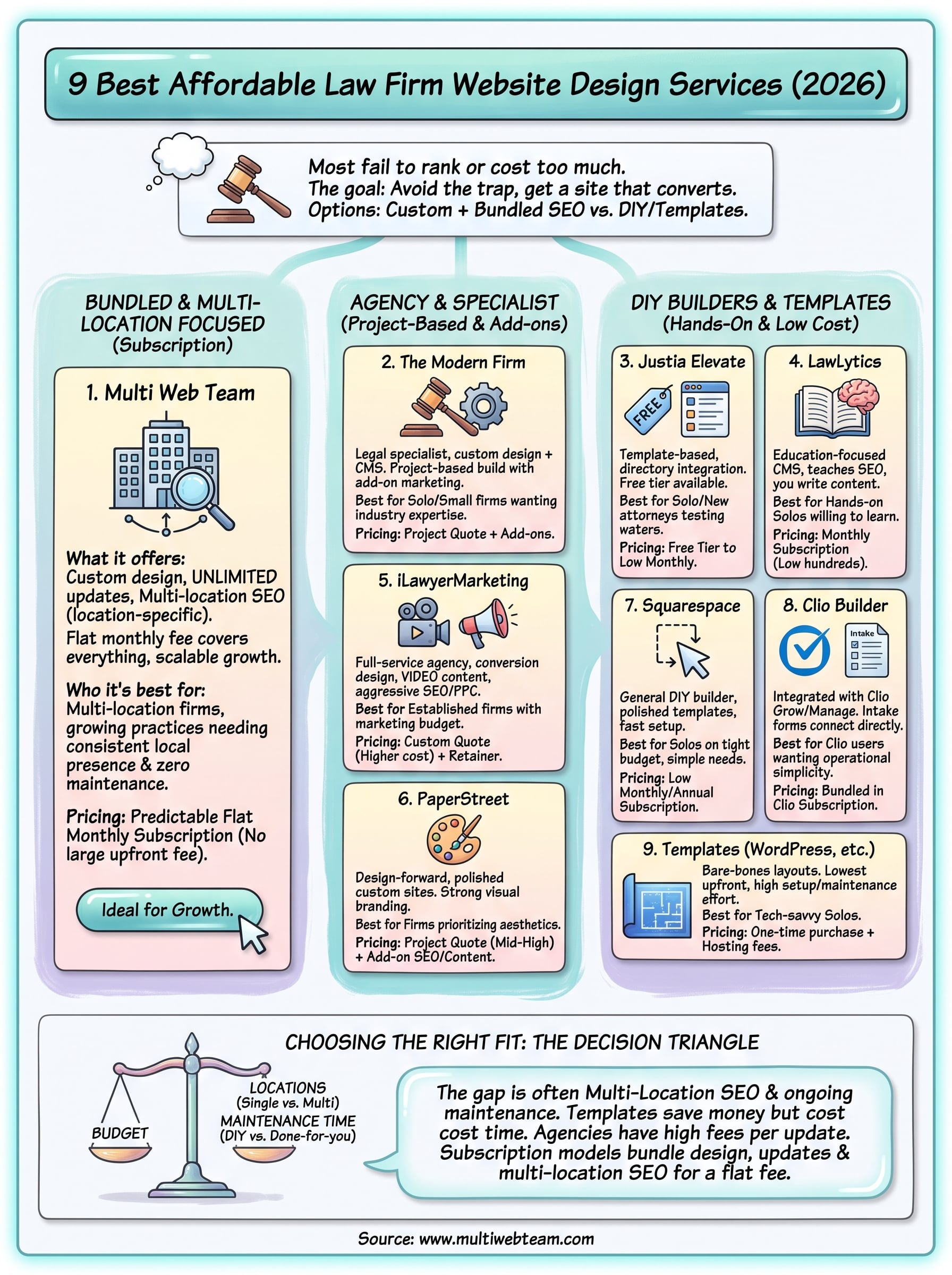
Your decision really comes down to three factors: budget, how many locations you're managing, and how much time you want to spend maintaining the site yourself. A solo attorney with one office can get away with a template or a builder like Squarespace. A firm with real growth plans and multiple locations needs location-specific SEO baked into the structure from day one, not bolted on later as an afterthought.
That's the gap most affordable law firm website design options leave open. Templates save money upfront but cost you hours. Agencies deliver polish but bill separately for every update and every new office. A subscription model that bundles design, unlimited updates, and multi-location SEO into one flat fee avoids both problems.
If your firm operates across multiple cities and you want a site built for that exact situation, see how Multi Web Team can help your firm grow.