
How To Rank Higher On Google Maps: Step-By-Step Guide
Your Google Business Profile is live, your address is correct, and your hours are up to date, but customers still aren't finding you. If you've been wondering how to rank higher on Google Maps , you're not alone. Most local businesses (especially those with multiple locations) struggle to break into the top results, and the difference between showing up and being invisible can come down to a handful of optimization steps.
Google Maps rankings depend on three core factors: relevance, distance, and prominence. You can't control where a searcher is standing, but you can absolutely influence how Google evaluates your business for the other two. That means optimizing your profile, building local authority, and staying consistent across every location. For multi-location businesses and franchises, this gets complicated fast, each location needs its own localized strategy to compete in its specific market .
At Multi Web Team, we handle local SEO and website optimization for multi-location businesses every day. This guide breaks down the exact steps we follow to help individual locations rank higher in Google Maps results. Whether you manage two locations or twenty, you'll walk away with a clear, actionable plan you can start implementing right now.
How Google Maps ranking works in 2026
Google uses three core signals to decide which businesses appear in the local pack (the map results you see at the top of a search): relevance, distance, and prominence . Understanding how these signals interact tells you exactly where to focus your energy when learning how to rank higher on Google Maps. You cannot game the algorithm, but you can systematically improve your standing across every signal it measures.
Relevance: Matching what the searcher wants
Relevance measures how well your Google Business Profile (GBP) matches what someone searched for. Google looks at your primary and secondary categories, your business description, the services you list, and even the keywords that appear inside customer reviews. If someone searches "Italian restaurant open late," Google cross-references those words against every signal in your profile to find the best match.
This is why a thin or incomplete profile will consistently underperform, even if your business sits physically close to the searcher. Every field you fill out gives Google more data to work with when deciding whether your listing fits a given query.
Distance: The factor you can't fully control
Distance measures how far your business is from the searcher or from the location they typed into the search bar. If someone searches "pizza near me" while standing two blocks from your shop, distance works in your favor. But if your main competitor is one block closer, distance alone becomes the tiebreaker that your profile quality needs to overcome.
For multi-location businesses, this is actually a structural advantage. Each verified location creates a separate ranking entity , which means a business with five locations can dominate five different geographic zones that a single-location competitor can never reach.
Prominence: The signal you build over time
Prominence reflects how well-known and trusted Google perceives your business to be. It pulls from review count, average star rating, and local citations (consistent mentions of your business name, address, and phone number across the web), along with backlinks to your website and how actively you manage your GBP.
Prominence is the one factor where consistent effort compounds. A business that earns reviews weekly, updates its profile regularly, and builds local citations will steadily outrank a stronger brand that ignores its local presence.
Google also factors in behavioral signals in 2026, including click-through rates from search results, direction requests, phone calls made directly through the listing, and time spent on your website after a Maps visit. These actions tell Google that real people find your business useful , which reinforces your ranking across all three categories.
What changed in 2026
AI-powered search features and the continued expansion of Google's AI Overviews have pushed the local pack higher in results for many queries. That means more visibility for top-ranked listings, but also sharper competition to get there. Google has also increased how much weight it places on profile completeness and recent activity , so a GBP that hasn't been updated in several months will lose ground to more active competitors. Here is what Google now weighs more heavily than it did two years ago:
- Photo freshness : Recently added photos get more weight than older uploads
- Post frequency : Regular GBP posts signal that your business is active
- Review response rate : Replying to reviews, both positive and negative, boosts trust signals
- Service and product detail : Fully built-out service menus and product listings improve relevance matching
- Website alignment : Google checks whether your website content matches your GBP data
Step 1. Claim and verify every location
You cannot improve what you haven't claimed. Unclaimed listings give Google very little to work with, and they leave your business vulnerable to incorrect edits from third parties. Before you can do anything else to rank higher on Google Maps, each of your locations needs a verified Google Business Profile tied to your Google account. Verification signals to Google that a real, legitimate business operates at that address, which directly feeds into your prominence score.
How to claim your Google Business Profile
Start by going to google.com/business and signing in with the Google account you want to use to manage your locations. Search for your business name and address in the setup flow. If a listing already exists, select it and request ownership. If no listing exists , create a new one from scratch and fill in the address exactly as it appears on your storefront or official documents.
Google offers several verification methods depending on your business type, including postcard by mail, phone call, video recording, or instant verification if your business is already confirmed in Google Search Console. Most businesses receive a postcard within 5 business days containing a 5-digit code you enter inside your GBP dashboard to complete verification.
Skipping verification is the single most common reason a business shows up with missing information or loses ranking ground to a competitor that took 10 minutes to complete the process.
Managing bulk verification for multiple locations
If you manage 10 or more locations under the same brand, Google lets you apply for bulk verification through the Business Profile Manager. This process is faster than verifying each address individually and keeps all your profiles organized under one account.
Here is what you need to prepare before submitting a bulk verification request:
- Each location's business name, address, phone number, website URL, and primary category in a single spreadsheet
- Consistent formatting across all entries (no abbreviations in one row and full words in another)
- A single Google account with owner or manager access to every location you're submitting
Once Google approves the request, your locations typically clear verification within a few days. After that, each address becomes eligible to appear in local search results, giving you the foundation every other optimization step in this guide builds on.
Step 2. Nail NAP, categories, and services
Your Google Business Profile is only as strong as the accuracy and consistency of the information inside it . NAP stands for Name, Address, and Phone number, and these three details need to match exactly across your GBP, your website, and every other directory that mentions your business. Even minor inconsistencies, like "St." on one listing and "Street" on another, send conflicting signals to Google and chip away at the prominence score you're trying to build.
Keep your NAP identical everywhere
Pick one format for your business name, address, and phone number, then use that exact format everywhere without variation. If your storefront says "Suite 200," every listing should say "Suite 200," not "#200" or "Ste. 200." The same logic applies to your phone number format and your business name. Do not add extra keywords to your GBP name that don't appear on your actual signage. Google treats that as spam and it can get your listing suspended.
Inconsistent NAP data is one of the most common reasons a well-optimized profile still underperforms in local rankings.
Here is a quick reference for what consistent NAP looks like across platforms:
| Field | Correct | Incorrect |
|---|---|---|
| Business name | Sunrise Fitness - Austin | Sunrise Fitness Austin TX |
| Address | 400 Lavaca Street, Suite 200 | 400 Lavaca St #200 |
| Phone number | (512) 555-0192 | 512-555-0192 |
Choose the right categories
Your primary category is the single most important field in your entire GBP, so choose the one that most directly describes what your business does, not a broad umbrella term. A physical therapy clinic should select "Physical Therapist," not "Health Consultant." After your primary category, add secondary categories that reflect additional services you offer, but keep them accurate. Padding your profile with loosely related categories does not help your rankings and can confuse Google's relevance matching.
Fill in every service you offer
The services section lets you list individual offerings with names, descriptions, and prices . Use this space to mirror the language your customers actually search for. If you run a car wash, list "Interior Detailing," "Ceramic Coating," and "Full-Service Wash" as separate line items. This is a direct path to improving how to rank higher on Google Maps for specific service-based queries rather than just broad category searches.
Step 3. Add photos, products, and posts
An empty or photo-light profile tells Google (and potential customers) that your business isn't actively managed. Photo count and photo freshness are both ranking signals Google weighs when deciding where to place your listing, and adding new images regularly is one of the fastest ways to signal activity without spending any money.
Businesses with more than 100 photos on their GBP receive significantly more direction requests and website clicks than those with fewer than 10.
Upload photos that show your business in action
Google recommends uploading at least one new photo per week to keep your profile fresh. Cover every relevant category: exterior shots so customers can find you, interior shots that set expectations, team photos that build trust, and product or service images that show exactly what you offer. Use real photos taken at your actual location, not stock images. Google can detect and deprioritize stock content.
Here is a simple upload checklist for each location:
- Exterior (at least 3 angles, including your signage)
- Interior (seating area, front desk, or workspace)
- Team or staff photos
- Product or service in action
- Any current promotions or seasonal displays
Add products and services to capture specific searches
The products and services sections give you a structured way to tell Google exactly what you sell, which directly improves how to rank higher on Google Maps for specific queries. Each entry should include a clear, searchable name and a short description written the way your customers would phrase it, not internal shorthand. For example, a dental office should list "Teeth Whitening," "Emergency Dental Visit," and "Invisalign Consultation" as separate items rather than grouping everything under "Dental Services."
Post weekly to stay active
GBP posts work like updates tied directly to your search visibility . Each post stays live for seven days, so publishing at least once per week keeps fresh content in front of both Google and searchers. Use posts to highlight current promotions, announce new services, or share location-specific updates. Here is a reusable post template:
[What's new or on offer] + [Specific detail or date] + [Clear next step for the customer]
Example: "Our Austin location is now open Sundays 10am to 4pm. Walk-ins welcome, no appointment needed."
Step 4. Get more reviews and reply fast
Reviews are one of the most direct ways to understand how to rank higher on Google Maps , because Google treats review count and recency as active prominence signals. A profile that collects reviews consistently will outrank a profile with a higher average star rating but no new reviews in six months. Your goal isn't just to have a lot of reviews; it's to have a steady, ongoing stream that signals to Google your business is active and trusted right now.
Ask for reviews at the right moment
The best time to ask is immediately after a positive interaction , when the experience is still fresh. Train your staff to ask in person at checkout or at the end of a service appointment. For businesses that communicate digitally, send a follow-up message within 24 hours. Here is a short, reusable review request template you can send by text or email:
"Hi [First Name], thanks for visiting us today. If you have a moment, we'd love a quick review on Google. It helps other customers find us and takes less than two minutes: [your short Google review link]"
You can generate your direct review link by going to your Google Business Profile, navigating to your dashboard, and copying the link under "Ask for reviews." Shorten it with a URL shortener before sharing so it's easy to tap on a phone.
Reply to every review, not just the negative ones
Responding to reviews tells Google that you actively manage your profile, and it tells potential customers that your business pays attention. Aim to reply within 24 to 48 hours of receiving any review. For positive reviews, thank the customer by name and mention a specific detail from their feedback to show the response is genuine, not a copy-paste. For negative reviews, acknowledge the issue without arguing, offer a path to resolution, and move the conversation offline by providing a direct contact number or email. Here is a simple response framework for both scenarios:
| Review type | Response structure |
|---|---|
| Positive | Thank by name + reflect their specific comment + invite them back |
| Negative | Acknowledge the experience + apologize + offer a resolution path |
| No text (stars only) | Brief thank-you + mention something specific about your business |
Step 5. Build the local SEO around your GBP
Your Google Business Profile doesn't operate in isolation. Google cross-checks your GBP data against your website and third-party directories to confirm that the signals all point to the same business. When your website reinforces what your profile says, you give Google more confidence to rank your listing higher. This step is where knowing how to rank higher on Google Maps stops being just a profile optimization task and becomes a broader local SEO effort that compounds over time.
Build dedicated location pages on your website
Every location you operate should have its own dedicated page on your website with content written specifically for that area. A generic "Contact Us" page listing all your addresses is not enough. Each location page should include the full NAP in plain text (not just an image), an embedded Google Map, locally relevant keywords, and unique content describing what that specific location offers. This gives Google a webpage it can directly associate with each GBP listing, which strengthens your local relevance signal considerably.
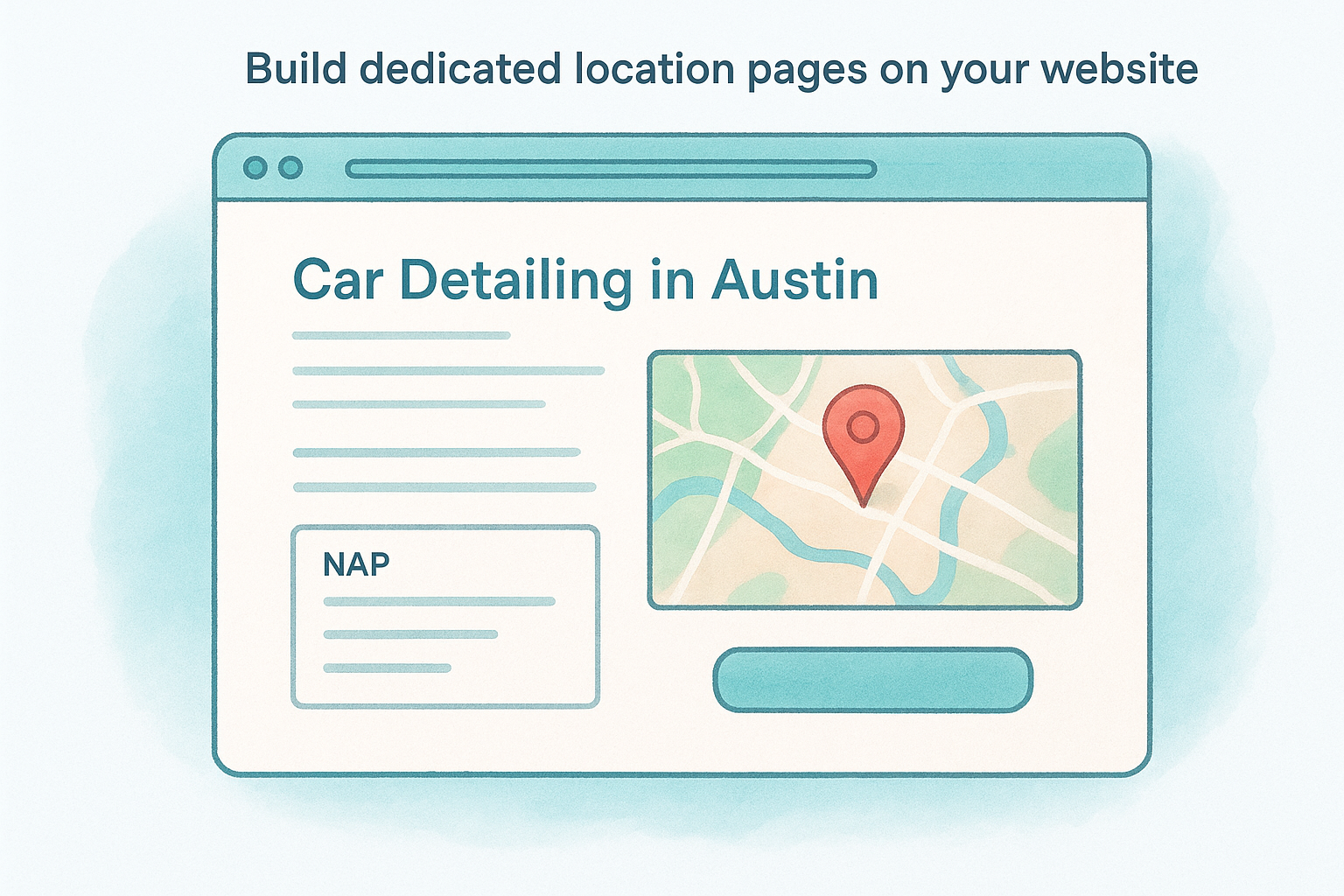
Here is a content structure template for each location page:
- H1 : [Service] in [City] (e.g., "Car Detailing in Austin")
- Body : 2-3 paragraphs mentioning the city, neighborhood, and specific services at that location
- NAP block : Exact name, address, and phone number matching your GBP precisely
- Embedded map : Google Maps iframe for that specific address
- CTA : Clickable phone number or direct booking button
Earn local citations from authoritative directories
Local citations are mentions of your business name, address, and phone number on external websites. Submit your business to major platforms like Google, Apple Maps Connect, and Bing Places first, then move to industry-specific directories relevant to your category. Keep your NAP format identical across every submission so Google sees consistent data no matter where it pulls information from.
Each citation from a credible source adds a small but real signal to your prominence score, and those signals stack steadily over months of consistent effort.
Focus on quality over volume. A listing on a high-authority directory with complete information carries more ranking weight than ten entries on low-traffic sites with missing fields. Audit your existing citations every quarter using a simple spreadsheet to catch formatting inconsistencies before they quietly pull your rankings down.
Keep climbing after you hit the top 3
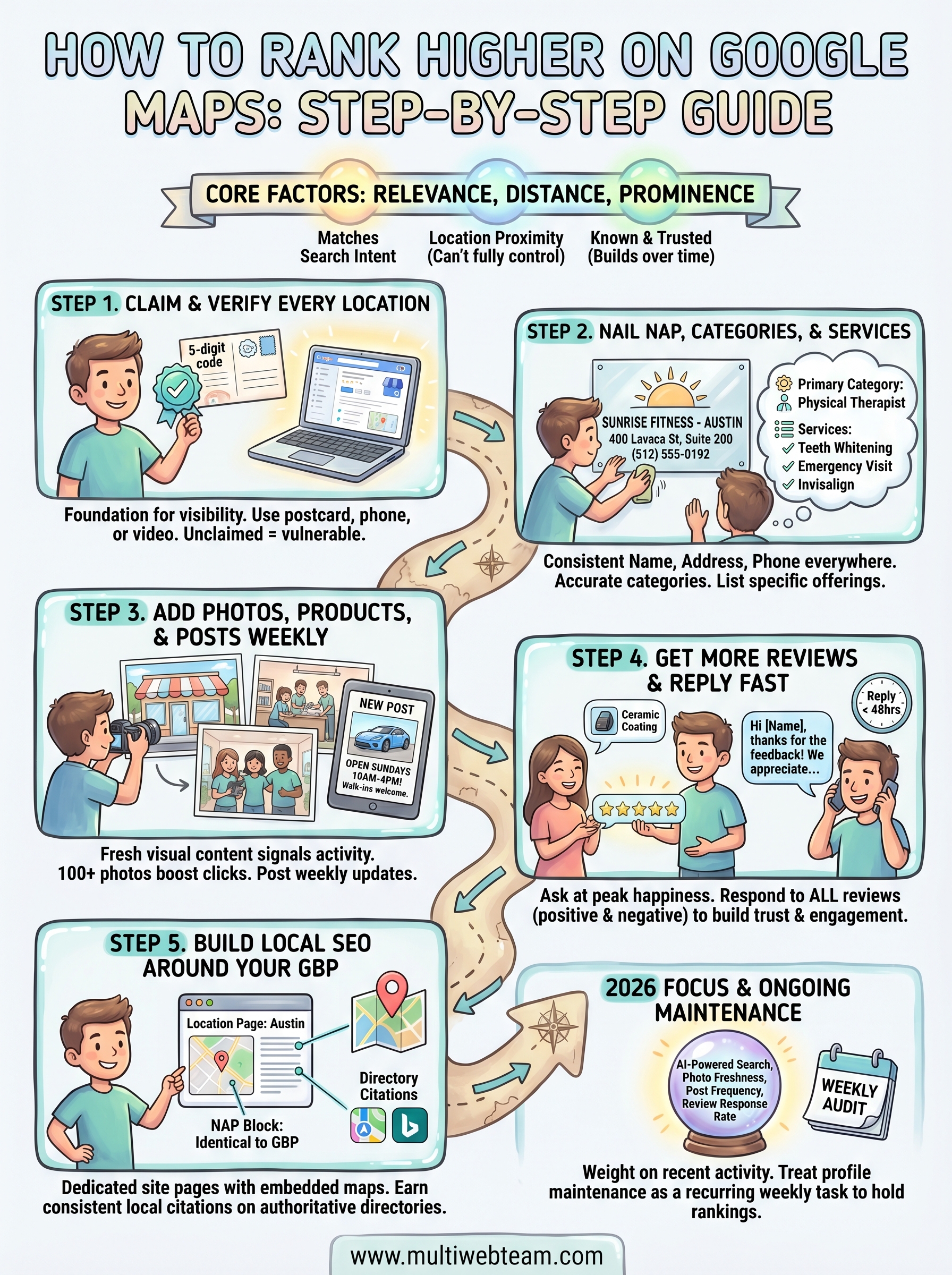
Breaking into the local pack is not the finish line. Google continuously re-evaluates every active competitor in your area , so a listing you outranked last month can surpass you again if you stop posting, stop collecting reviews, or let your NAP data drift across directories. The businesses that hold their positions treat profile maintenance as a recurring weekly task , not a one-time project.
Set a simple monthly audit to check photo freshness, review response rate, citation consistency, and post frequency across every location you manage. If you run multiple locations and this starts to feel unmanageable, that's a sign you need a dedicated local SEO process rather than ad hoc updates. Knowing how to rank higher on Google Maps is only half the work; executing it consistently across every location is where most businesses fall short. If you want a team handling that work for you, explore what Multi Web Team does for multi-location businesses.










