

How Often Should You Update Website Content for SEO?
Your website isn't a billboard you put up once and forget about. It's a living asset that needs attention, and knowing how often should you update website content matters more than most business owners realize. Stale pages send a clear signal to both search engines and potential customers: this business might not be paying attention . For multi-location businesses and franchises, that signal gets amplified across every location page that sits untouched.
At Multi Web Team, we manage websites for multi-location businesses on a subscription basis, which means we handle content updates continuously , not once a year when someone finally notices the homepage still mentions a 2024 promotion. That hands-on experience across dozens of locations has given us a clear picture of what update frequency actually moves the needle for SEO and what's just busywork.
This article breaks down how often different types of content need refreshing, what signals tell you a page is overdue for an update, and how to build a realistic update schedule that keeps your site competitive. Whether you're managing five locations or fifty, you'll walk away with a practical framework you can act on immediately.
Why update frequency matters for SEO
Search engines don't index your pages once and move on. Google's crawlers return to pages repeatedly , and the frequency of those return visits depends heavily on how often your site changes. When you understand this cycle, how often should you update website content stops feeling like a vague best practice and becomes a concrete ranking factor you can manage. Businesses that update regularly earn faster indexing, more frequent crawl visits, and a stronger competitive position in search results.
How Google's crawl cycle responds to fresh content
Google assigns each page a crawl priority based on signals like how often the page changes and how much authority the site has built. Pages that update consistently get recrawled more often, meaning new content, edited copy, or corrected details get indexed faster. Pages that sit untouched for months get deprioritized, and changes you eventually make can take weeks to surface in search results rather than days.
The more consistently you update your site, the faster Google picks up those changes and the more competitive your pages stay in search results.
This dynamic matters most in local search , where rankings shift frequently based on relevance signals. A competitor who refreshes their location pages regularly signals freshness to Google, while your static pages gradually fall behind. You don't need to rewrite content constantly, but a pattern of regular, meaningful updates trains Google's crawlers to check back more often and keeps your pages competitive.
Why stale content hurts your rankings beyond crawl frequency
Freshness affects more than crawl rates. Google's helpful content guidelines place significant weight on whether content accurately reflects the current state of a topic, business, or service. A page that references outdated hours, discontinued offerings, or old pricing doesn't just frustrate visitors. It signals to Google that the page may no longer be reliable or trustworthy , which can suppress its rankings over time.
User behavior reinforces this problem directly. When visitors land on a page with outdated or inaccurate information , they leave quickly. High bounce rates and short sessions tell Google the page failed to satisfy the search query, and that feedback loops into how the page performs in future rankings. Keeping content current reduces that friction, gives visitors accurate and useful information , and improves the engagement signals that support your SEO over the long term.
What counts as a content update
Not every change you make to a page qualifies as a meaningful update in Google's eyes. Changing a publish date without editing the actual content is a known manipulation tactic, and Google's guidelines explicitly warn against it. When you're thinking about how often should you update website content , the more useful question is: what kinds of changes actually improve the page for a real visitor?
Meaningful updates that signal freshness
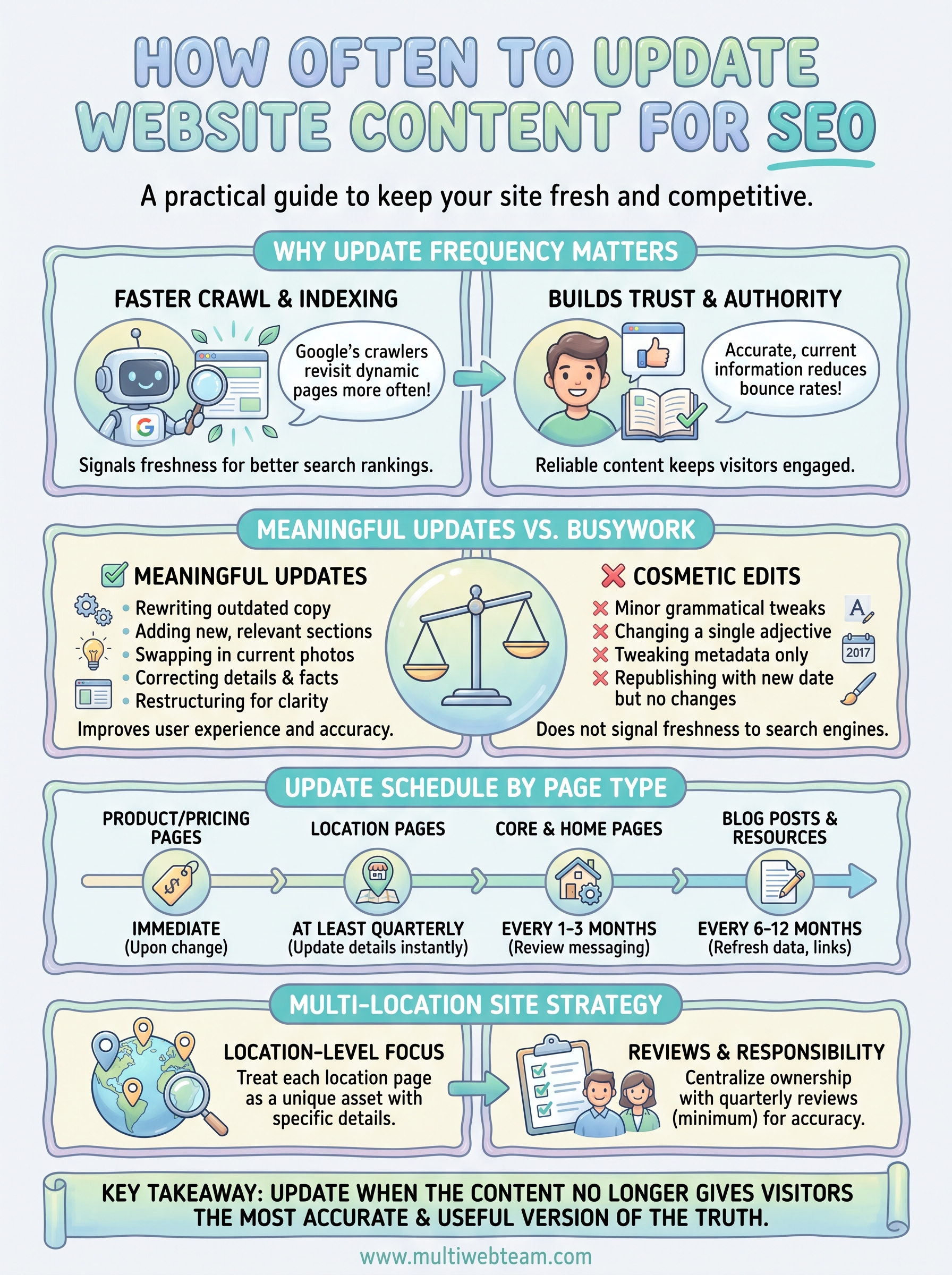
A meaningful update changes the substance of a page , not just its surface. Rewriting outdated copy, adding a new section that addresses a question your customers frequently ask, swapping in current photos, or correcting inaccurate details all qualify. Adding a newly launched service, updating pricing that has changed, or incorporating current and accurate information from a credible source are also strong updates.
A good rule of thumb: if the update makes the page more accurate, more useful, or more complete for a visitor, it counts.
You can also strengthen a page by restructuring how information is presented . Breaking a dense block of text into shorter sections, adding a table to compare options, or clarifying a call to action all improve the page experience. Google's crawlers pick up these structural changes, and visitors benefit from a clearer and more readable page as a result.
What doesn't qualify as a real update
Swapping a comma for a period, changing one adjective, or tweaking metadata without editing page content won't signal freshness to search engines. Minor cosmetic edits that don't improve the reader's experience carry no SEO value. Similarly, republishing a page with a new date while leaving the content identical is a tactic Google specifically identifies as a red flag in its helpful content guidelines.
The standard to apply is straightforward: could a visitor read the updated page and get something more useful, accurate, or relevant than they would have from the old version? If yes, it's a real update. If not, save your effort for changes that actually move the needle .
How often to update content by page type
Not all pages need the same attention on the same schedule. How often should you update website content depends heavily on what the page does, who it serves, and how quickly the information on it becomes outdated. A practical update schedule starts by grouping your pages into categories, then assigning a realistic refresh cadence to each group.
Core service and home pages
Your homepage and primary service pages carry the most weight for first impressions and conversions. Review these every one to three months , even if the changes are minor. If your pricing, service offerings, or value proposition shifts, update these pages immediately. Leaving outdated core messaging live signals to both visitors and search engines that your site may not reflect how your business actually operates today .
Blog posts and resource articles
Evergreen blog content should be reviewed every six to twelve months . Focus on any statistics, external references, or step-by-step processes that could have changed since you first published. A well-maintained article that stays accurate over time consistently outperforms a freshly published piece that nobody revisits or improves.
Refreshing a strong older post that already ranks is often more effective than writing a new one from scratch.
Location pages
For multi-location businesses, location pages need attention more frequently than most owners expect . Hours, staff information, local promotions, and service offerings change at the location level regularly. Review these pages at least quarterly , and update them immediately whenever a location-level detail changes. Stale location pages directly threaten your local search rankings, since Google weighs accuracy and relevance heavily for location-based queries.
Product and pricing pages
These pages demand the most immediate updates. Any change to pricing, availability, or product details should go live the same day the change takes effect. Visitors who find incorrect pricing or discontinued offerings lose trust fast, and that lost trust shows up as poor engagement signals that drag down your rankings over time.
How to set an update schedule that works
Knowing how often should you update website content is only useful if you build a system around it. Most business owners have good intentions but no structure, so updates happen reactively when something breaks or a customer complains, rather than proactively on a repeatable schedule that keeps your site performing consistently in search results.
Start with a content audit
Before you set any schedule, you need a clear picture of what you're working with. List every page on your site and note when each one was last meaningfully updated. Flag any page that hasn't changed in over six months as a priority review, and identify pages where key facts like pricing, hours, or service offerings may have shifted since the content was written. This audit gives you a concrete starting point instead of guessing where problems exist.
Running a content audit before building your schedule prevents you from wasting time on pages that are already in good shape while ignoring the ones that are quietly losing ground in search results.
Build a repeatable calendar
Once you know which pages need attention, assign each page type a review date based on the cadence you established in the previous section. Your homepage and core service pages go on a quarterly review cycle. Blog posts land on a six-month cycle. Location pages and pricing pages get flagged for immediate updates the moment any location-level detail changes.
A simple spreadsheet works fine for most businesses. Track the page URL, the last updated date, the next scheduled review date, and the person responsible for making each change. The goal isn't a complicated project management system. It's a consistent one that keeps your team accountable and ensures no page sits untouched long enough to hurt your rankings. Block time on your calendar for these reviews the same way you would for any other recurring business task, and treat them as fixed commitments rather than optional to-dos.
How to handle updates on multi-location sites
Multi-location businesses face a challenge single-location sites don't: every location page is a separate ranking opportunity , and each one can fall behind independently. When you think about how often should you update website content across a portfolio of location pages, the answer isn't the same for every page. Each location has its own hours, staff, promotions, and seasonal details, and updates at one location rarely apply to all the others.
Build a location-level update process
The biggest mistake multi-location operators make is treating all location pages as identical and pushing the same generic copy across all of them. Each location page should reflect the specific, accurate details of that location , including its address, hours, staff names, photos, and any offers unique to that area. When you manage updates at this granular level, each page becomes more relevant to local search queries and better aligned with what Google looks for in location-specific results.
Treating each location page as its own standalone asset, rather than a copy of a template, is what separates sites that dominate local search from those that barely appear.
Review each location page on a quarterly schedule at minimum , and update it immediately any time a location-level detail changes. This cadence keeps your pages accurate without requiring your team to be in constant review mode.
Centralize responsibility without losing local accuracy
For multi-location businesses, keeping location pages current requires clear ownership at the page or regional level. Without a defined owner, updates fall through the gaps and pages drift out of date at different rates across your locations. Assign a specific person to review and maintain each location page on a fixed schedule and give them a simple checklist to follow at each review.
Accurate and timely location pages protect your local search rankings and give customers reliable information when they find your business online. Building this accountability into your operations means location changes go live the same week they take effect , not months later when someone finally notices the error.
Next steps
How often should you update website content comes down to one consistent principle: update when the content no longer gives visitors the most accurate and useful version of the truth. Your homepage and service pages need a review every one to three months. Blog posts and evergreen resources need a check every six to twelve months. Location pages and pricing pages need updates the moment any detail changes. Build a simple calendar, assign ownership, and treat those review dates as fixed commitments rather than suggestions.
For multi-location businesses, the volume of pages makes this process harder to manage internally. Falling behind on even a handful of location pages can cost you local search rankings you've worked hard to earn. If you want a team that handles content updates continuously, without you having to track every page across every location, learn how Multi Web Team manages it for you.