
How To Manage Multiple WordPress Websites: 7 Best Tools
Running five, ten, or fifty locations means running five, ten, or fifty websites, each needing plugin updates, security patches, content changes, and backups. Figuring out how to manage multiple WordPress websites without losing your mind (or your weekend) is a real operational challenge, especially for franchise and multi-location businesses that need every site performing at all times.
The good news: you don't have to log into each site individually. Centralized management tools let you handle updates, security, and maintenance from a single dashboard, cutting hours of repetitive work every week. Some businesses go with WordPress Multisite , while others prefer third-party platforms that offer more flexibility and control.
This article breaks down 7 of the best tools for managing multiple WordPress sites, compares their strengths, and helps you figure out which approach fits your setup. At Multi Web Team, we build and manage websites for multi-location businesses every day, so we put this list together based on what actually works at scale , not just feature lists and marketing promises.
1. Multi Web Team
Multi Web Team is a managed web design and maintenance service built specifically for franchise owners and multi-location businesses . Instead of giving you a dashboard to log into, Multi Web Team acts as your external web team, handling the design, updates, SEO, and ongoing maintenance across all your locations so you never have to touch the backend yourself.
How it manages multiple WordPress sites
Multi Web Team builds your sites on WordPress and manages them through a centralized internal system , meaning updates, security patches, plugin management, and content changes all happen on their end. You send requests, and they execute. If you're trying to figure out how to manage multiple WordPress websites without building an internal team, this is the most hands-off approach on this list. Every location gets its own optimized page structure , and the service handles location-specific SEO alongside routine technical maintenance.
This is not a self-service tool. Multi Web Team replaces the need for a management tool entirely by handling the work for you.
Best fit and not a fit
Multi Web Team is a strong fit for franchise operators or multi-location business owners who want a professional, consistent web presence across all locations without spending time managing it. If you run a restaurant group, a fitness franchise, or a regional service business with 5 to 50+ locations, this service fits your operational model well. You get custom design and continuous upkeep without hiring a web developer or a marketing coordinator.
It is not a fit if you want to manage your own sites hands-on, have a technical in-house team already doing the work, or run a single-location business. This service is priced and scoped for businesses where the volume of locations makes self-management impractical.
What you handle vs what they handle
The division here is clear. Your responsibility is to communicate business updates to the team: new promotions, menu changes, photos, hours, and any content you want refreshed. Multi Web Team handles everything else, including plugin updates, backups, security, and SEO.

| Your responsibility | Multi Web Team handles |
|---|---|
| Sending content updates | Publishing all website changes |
| Providing brand assets | Design and layout management |
| Approving new pages | SEO optimization per location |
| Sharing business information | Plugin updates and security patches |
| Reviewing performance | Backups and technical maintenance |
This model works because it removes the technical overhead from your plate entirely, which is where most multi-location operators lose the most time each month.
Pricing approach
Multi Web Team operates on a monthly subscription model , which means no large upfront design fees and no per-update charges. You pay a recurring flat rate that covers design, ongoing management, unlimited content updates, and SEO work. The exact pricing depends on the number of locations and the scope of the project.
This structure makes budget planning predictable , which matters for franchise systems where costs need to scale in a manageable way. There are no surprise invoices when you want to add a new promotion or refresh your photos. You contact the team, and the work gets done as part of your existing subscription.
2. ManageWP
ManageWP is one of the most widely used third-party platforms for centralizing WordPress site management. It connects to all your sites through a worker plugin , then pulls everything into a single dashboard where you can run updates, check performance, and schedule backups without opening each site individually.
How it manages multiple WordPress sites
ManageWP gives you a cloud-based control panel that handles multiple WordPress sites through a lightweight plugin installed on each site. Once connected, you can push plugin, theme, and core updates to all your sites at once, run bulk actions across your entire portfolio , and view site health in one place. If you're working out how to manage multiple WordPress websites for a growing location network, ManageWP cuts the repetitive login-and-update cycle down significantly.
Standout features to look at first
ManageWP packs in a solid range of features that go beyond basic updates. The ones worth evaluating first include:
- Automated backups with off-site storage to Google Drive or Amazon S3
- Safe Updates , which takes a before-and-after screenshot so you can catch visual regressions
- Client reporting that generates white-label performance summaries automatically
- Uptime monitoring that alerts you when a site goes down
Safe Updates is particularly useful for multi-location operators where a broken site at even one location means lost business.
Tradeoffs and risks to plan for
ManageWP works well, but it comes with trade-offs you should weigh before committing. The free tier is limited , and most features that matter at scale, like advanced backups, performance checks, and SEO tools, require add-on purchases per site. That per-site pricing structure means costs stack up quickly when you're managing 10 or more locations. You're also still responsible for monitoring, reviewing, and acting on alerts yourself. The tool surfaces information; it does not take action for you.
Pricing approach
ManageWP offers a free base plan with core update management included. Premium add-ons like advanced backups, uptime monitoring, and performance checks are billed per site per month , typically ranging from $1 to $2 per feature per site. For large portfolios, that adds up fast.
3. MainWP
MainWP is a self-hosted WordPress management platform that gives you full control over your dashboard and your data. Unlike cloud-based tools, MainWP runs directly on your own WordPress installation , which appeals to operators who want to keep everything on their own server rather than routing site data through a third-party service.
How it manages multiple WordPress sites
MainWP connects to child sites through a dedicated plugin installed on each location's site. Once connected, you manage updates, backups, security scans, and content from a central parent dashboard that you host yourself. If you're working out how to manage multiple WordPress websites without sending your data through external servers, MainWP gives you that independence. Every action you take, whether bulk-updating plugins across 10 locations or pulling uptime reports, runs through your own infrastructure .
Standout features to look at first
MainWP's open architecture is its biggest advantage, and several features stand out when you're evaluating it for a multi-location setup:
- Extensions marketplace with 100+ add-ons covering everything from client billing to advanced SEO tools
- Bulk update controls with per-site override options so you can push updates selectively
- White-label reporting that lets you brand dashboards and reports for clients or stakeholders
- Vulnerability monitoring that flags outdated or at-risk plugins before they become a problem
The extensions marketplace is where MainWP's real power lives, but it also means your feature set depends heavily on which add-ons you pick and maintain.
Tradeoffs and risks to plan for
MainWP requires more technical setup and ongoing maintenance than cloud-based alternatives. You're responsible for keeping your parent dashboard site secure, updated, and running, which adds a layer of work that smaller teams sometimes underestimate. The platform is powerful, but the learning curve is steeper than tools like ManageWP, especially when configuring extensions and managing server-level access.
Pricing approach
MainWP offers a free core plan that covers basic management for unlimited sites. Premium extensions are sold individually or bundled into annual plans, with bundle pricing typically starting around $200 per year depending on the extensions included. Costs scale based on which add-ons your workflow requires.
4. WP Umbrella
WP Umbrella is a cloud-based WordPress management platform designed for agencies and developers handling multiple client sites. It focuses on monitoring, performance visibility, and reporting while keeping the interface clean and approachable compared to more feature-heavy competitors.
How it manages multiple WordPress sites
WP Umbrella connects to your sites through a lightweight plugin installed on each WordPress installation. Once connected, the platform pulls health data, uptime status, and update availability into a single cloud dashboard. If you're working out how to manage multiple WordPress websites with a focus on site health visibility , WP Umbrella gives you a clear picture across all locations at once. You can push plugin, theme, and core updates in bulk without logging into individual sites.
Standout features to look at first
WP Umbrella puts particular emphasis on monitoring and client communication , which separates it from tools focused purely on update management . Features worth evaluating early include:
- PHP error monitoring that surfaces code-level problems before they affect visitors
- Automated white-label reports you can schedule and send directly to stakeholders on a set cadence
- Performance tracking that monitors page speed over time across all connected sites
- Uptime alerts that notify you immediately when any location goes offline
The PHP error monitoring feature is one of the more practical differentiators here, since most management tools don't surface code-level issues until they become visible site problems.
Tradeoffs and risks to plan for
WP Umbrella's feature set is narrower than MainWP or ManageWP , so if you need advanced backup management or an extensive extensions library, you will hit its limits quickly. The platform works well for agencies managing client sites, but for franchise operators with complex per-location SEO requirements , it lacks the depth to cover everything. You still handle all monitoring responses, troubleshooting, and content updates yourself.
Pricing approach
WP Umbrella charges a flat monthly fee rather than per-site pricing, which makes costs more predictable for larger portfolios. Plans start at approximately $21 per month for up to 50 sites, with higher tiers available for larger portfolios. There is no permanent free plan, but a trial period lets you test the platform before committing.
5. InfiniteWP
InfiniteWP is a self-hosted WordPress management platform that lets you control an unlimited number of sites from a single admin panel installed on your own server. It follows a similar architecture to MainWP, but positions itself with a broader free feature set out of the box , making it a practical option for operators who want centralized control without committing to a recurring cloud subscription.
How it manages multiple WordPress sites
InfiniteWP works by installing a parent admin panel on one WordPress site and connecting all your other sites through a lightweight client plugin. Once linked, you can push plugin, theme, and WordPress core updates across your entire portfolio from one screen. If you're working out how to manage multiple WordPress websites without a recurring cloud fee, InfiniteWP gives you that option. Bulk actions like running updates, generating backups, and checking site status all work across every connected site simultaneously.
Standout features to look at first
InfiniteWP includes a solid range of core capabilities in its free tier that most cloud platforms lock behind paid plans. The features worth testing first include:
- One-click bulk updates for plugins, themes, and WordPress core across all sites
- Backup management with restore options built directly into the main dashboard
- Security scanning that checks sites for known vulnerabilities and malware signatures
- User management that lets you control admin access across multiple sites from one location
The free tier covering unlimited site connections for core management tasks is genuinely useful for operators who want to evaluate the platform before deciding whether premium add-ons fit their budget.
Tradeoffs and risks to plan for
InfiniteWP puts server maintenance responsibility squarely on you , since you host the parent panel yourself. If that server goes down or gets compromised, your management access to every connected site goes with it. The interface is also noticeably older in design compared to newer platforms, which can slow your workflow when navigating a large location portfolio. Reporting, scheduling, and several other practical features require premium add-ons to unlock.
Pricing approach
InfiniteWP offers a free core plan that covers unlimited site connections and basic management tasks. Premium plans start at around $147 per year for the Starter tier, which adds advanced backups, reporting tools, and additional integrations. Pricing scales upward based on the feature set your operation requires.
6. WP Remote
WP Remote is a cloud-based management platform that connects to your WordPress sites through a plugin and gives you a centralized place to handle updates, backups, and monitoring. It targets freelancers, small agencies, and operators who want a straightforward tool without the configuration overhead of self-hosted alternatives like MainWP or InfiniteWP.
How it manages multiple WordPress sites
WP Remote installs a lightweight connector plugin on each WordPress site you want to manage, then pulls all your sites into a single cloud dashboard. From there, you can push plugin, theme, and core updates across all connected sites without logging into each one separately. If you are working out how to manage multiple WordPress websites on a lean budget, WP Remote offers a free entry point that covers the basics most operators need day to day.
Standout features to look at first
WP Remote keeps its feature set focused rather than trying to compete with broader platforms on volume. The areas worth evaluating early include:
- One-click updates for plugins, themes, and WordPress core across all connected sites simultaneously
- Automated daily backups with restore options available directly from the dashboard
- Uptime monitoring that sends alerts when any connected site stops responding
- Team access controls that let you assign dashboard access to collaborators without sharing site credentials
The backup and restore workflow is the most practical feature here for multi-location operators, since recovering a broken site quickly matters more than most other capabilities.
Tradeoffs and risks to plan for
WP Remote's feature depth is limited compared to ManageWP or WP Umbrella, particularly around reporting and performance monitoring. You will not find detailed analytics, client-facing reports, or advanced SEO tooling built into the platform. For franchise operators managing locations where each site needs individual performance tracking, WP Remote may leave gaps you will need to fill with separate tools.
Pricing approach
WP Remote offers a free plan covering up to two sites , which works for testing but not for real multi-location management. Paid plans start at approximately $9 per month for additional sites, with pricing scaling based on the number of sites you connect and the backup storage you need.
7. SolidWP Central
SolidWP Central is a cloud-based WordPress management platform built by the team behind SolidSecurity (formerly iThemes Security) and SolidBackups (formerly BackupBuddy). If you already use those tools across your location sites, Central gives you a natural hub for managing everything without adding a completely separate toolset to your workflow.
How it manages multiple WordPress sites
Central connects to your sites through a lightweight plugin installed on each WordPress installation , then brings every connected site into a single cloud dashboard where you can push updates, monitor uptime, and track security status. If you are working out how to manage multiple WordPress websites and your team already runs SolidSecurity or SolidBackups on your locations, Central integrates tightly with both tools, reducing the friction of jumping between separate platforms to get a full picture of each site's health.
Standout features to look at first
The platform's strongest advantage is its native integration with the broader SolidWP security and backup ecosystem , which is where it separates itself from other management tools on this list. Features worth evaluating early include:
- One-click bulk updates for plugins, themes, and WordPress core across all connected sites
- Real-time security monitoring that pulls data directly from SolidSecurity installations on each site
- Uptime monitoring with instant alerts when any connected location goes offline
- Backup visibility that shows SolidBackups status across your entire portfolio at a glance
If your sites already run SolidSecurity, Central makes the most sense as your management layer since the two tools share data natively rather than through workarounds.
Tradeoffs and risks to plan for
Central's biggest limitation is that it works best inside the SolidWP ecosystem , which means operators using other security or backup plugins will not get the same depth of integration. Beyond that, the reporting and analytics capabilities are thinner than ManageWP or WP Umbrella, making it a weaker option for franchise operators who need per-location performance data or stakeholder-facing reports built into their workflow.
Pricing approach
Pricing for Central is structured around SolidWP's suite subscriptions , so the cost depends on which SolidWP products you already license. Standalone access starts at approximately $99 per year , though the platform delivers its best value when bundled with SolidSecurity and SolidBackups rather than purchased on its own.
Next steps
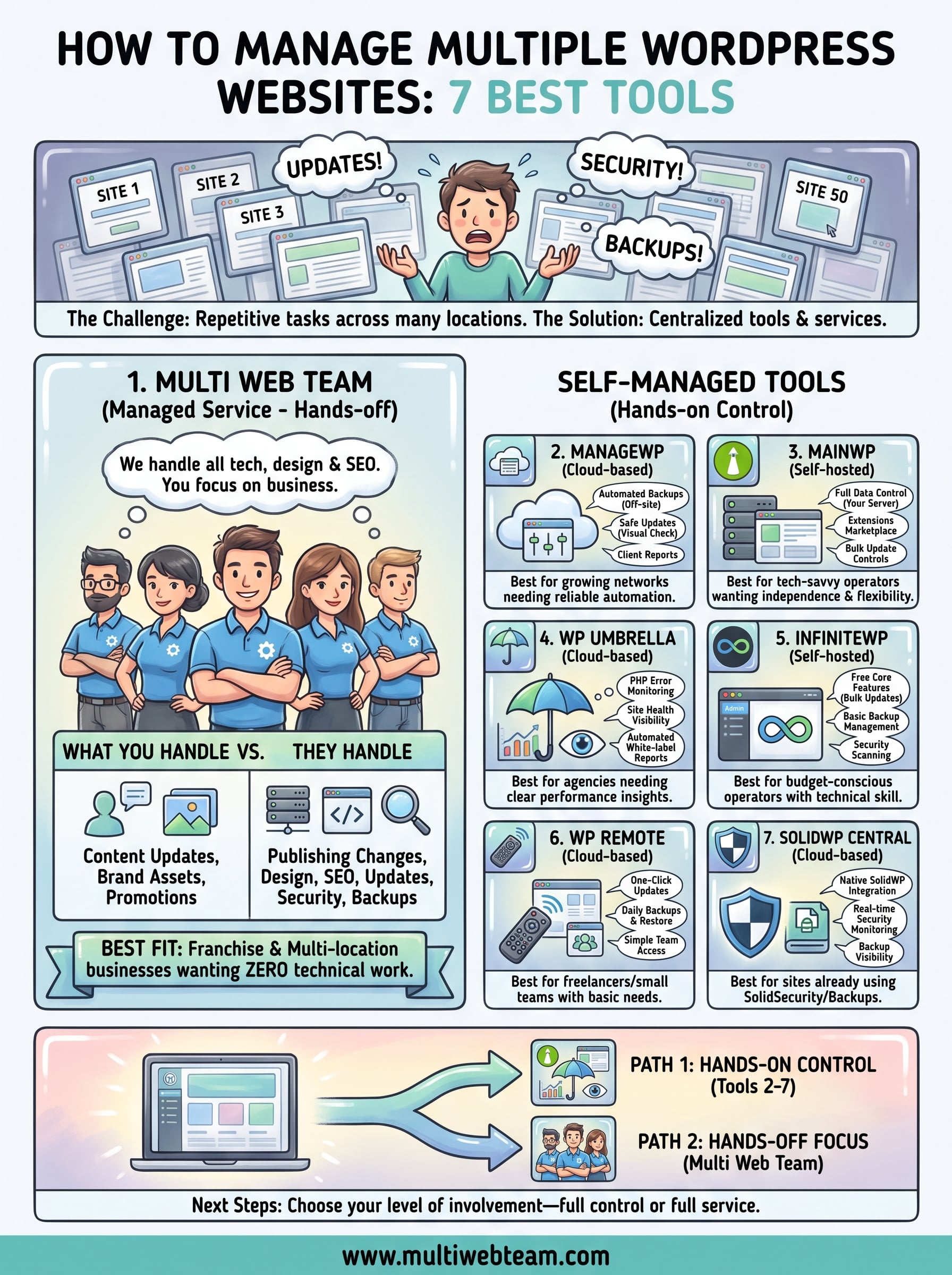
Every option on this list solves a different version of the same problem. If you want full control and hands-on management , tools like MainWP, ManageWP, or InfiniteWP give you the dashboard to handle it yourself. If your priority is visibility and monitoring with a cleaner interface, WP Umbrella or WP Remote cover the basics well. SolidWP Central fits best when your sites already run the SolidWP security stack.
But if you run a franchise or multi-location business and figuring out how to manage multiple WordPress websites is pulling your attention away from running your actual operation, that points toward a different solution entirely. Multi Web Team handles the design, maintenance, SEO, and updates across all your locations so your team never has to touch the backend. You focus on your business, and the websites stay sharp.
If that model fits what you need, visit Multi Web Team to learn more about how the service works.










