
Small Business SEO Strategy: A 2026 Step-by-Step Blueprint
Most small businesses don't fail at SEO because they lack budget. They fail because they chase the wrong tactics, spread effort too thin, or simply never start with a real plan. A solid small business SEO strategy doesn't require a massive team or an enterprise-level budget, it requires focus, consistency, and the right steps in the right order .
Here's the reality: Google processes billions of searches every day, and a significant chunk of those have local intent. People are actively looking for businesses like yours. The question isn't whether search traffic matters, it's whether your website is built and optimized to capture it. That gap between "having a website" and "having a website that actually ranks" is where most small businesses get stuck, especially those managing multiple locations without a dedicated marketing team.
At Multi Web Team, we build and manage websites for multi-location businesses and franchises, and SEO is baked into everything we do. This guide pulls from that hands-on experience. Below, you'll find a step-by-step blueprint for 2026 , practical, budget-conscious, and built for business owners who need results without the runaround. Whether you handle SEO yourself or hand it off to a team, this framework gives you a clear path forward .
What a small business SEO strategy looks like in 2026
SEO in 2026 is not the same game it was three years ago. AI-generated search results , zero-click answers , and Google's evolving ranking signals have shifted how search works at a fundamental level. But the core principle hasn't changed: Google still rewards websites that are relevant, trustworthy, and genuinely helpful to searchers. What has changed is the bar you need to clear to get there, and how you prove to both search engines and AI systems that your business deserves to show up.
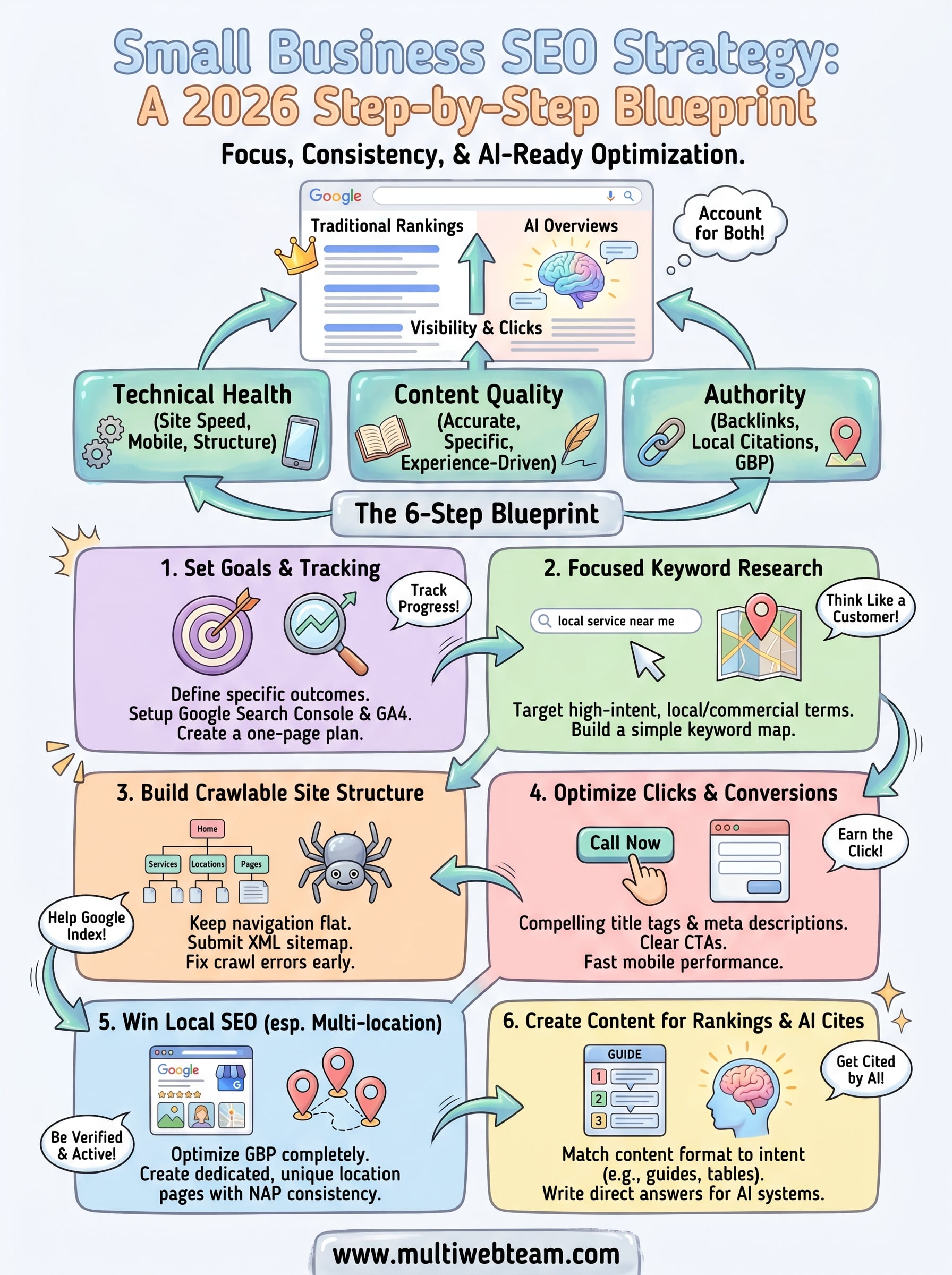
A small business SEO strategy in 2026 needs to account for both traditional search rankings and the AI-generated answers that now sit above them.
Your competition isn't only other small businesses anymore. AI Overviews (Google's AI-generated summaries at the top of search results) pull from pages that demonstrate clear expertise and structured information. If your site isn't built to be cited by those systems, you're handing visibility and clicks to competitors who are.
The pillars that still drive rankings
Technical health, content quality, and authority remain the three pillars of any effective SEO approach. None of that has changed. What has changed is the weight each pillar carries depending on your business type and location.
For small businesses, especially multi-location operations , local signals carry enormous weight. Google prioritizes businesses that have consistent, accurate, and location-specific information across their website and third-party listings. A well-structured site that clearly communicates what you do, where you do it, and who you serve will outperform a technically perfect but generic site almost every time. Here's a simple breakdown of what each pillar covers:
| Pillar | What it includes | Why it matters |
|---|---|---|
| Technical health | Site speed, crawlability, mobile optimization, structured data | Helps Google index and understand your site |
| Content quality | Accurate, specific, experience-driven pages | Earns rankings and AI citations |
| Authority | Backlinks, local citations, Google Business Profile | Signals trust to search engines |
What's actually different heading into 2026
Search behavior has fragmented across more surfaces than ever before. People use voice search, AI chat tools, and traditional search in different ways for different needs, and your content needs to show up across all of them. That means writing in clear, direct language that answers real questions, not stuffing pages with keywords and hoping for the best.
Structured data markup (schema) has gone from a nice-to-have to a genuine competitive advantage. When you mark up your pages with schema, you help Google (and AI systems) understand the context of your content, which increases the odds of appearing in rich results and AI-generated answers . Skipping structured data in 2026 means leaving visible real estate on the table.
Fast mobile performance is no longer optional either. Google's mobile-first indexing means Google crawls your mobile site first, and if that experience is slow or broken, your rankings suffer regardless of how strong your content is. Page speed and site structure are the foundation everything else sits on, and you can verify your current performance for free using Google's PageSpeed Insights.
Step 1. Set goals, tracking, and a simple SEO plan
Before you write a single page or change a meta tag, you need to know what you're optimizing for and how you'll measure progress. Skipping this step is one of the most common mistakes in any small business SEO strategy , because without clear goals, you can't tell if the work you're doing is actually moving the needle.
Define what you want SEO to do for your business
Not every business needs the same outcome from search. A multi-location franchise needs location-specific traffic and phone calls. A service-area business needs quote request form submissions . Before you set anything up, write down one to three specific outcomes you want SEO to drive, such as "rank in the top 3 for [service] in [city]" or "increase organic contact form submissions by 20% in six months." Specific goals give you a filter for every SEO decision you make going forward.
If you can't measure it, you can't improve it. Vague goals like "rank better" won't help you prioritize work or prove results.
Set up tracking before you touch anything else
Google Search Console and Google Analytics 4 are both free and give you the data you need to evaluate SEO performance. Connect Search Console to your site first, verify ownership, and submit your sitemap. Then link it to GA4 so you can see which organic search sessions lead to actual conversions, not just page views. You can set both up through Google Search Console and Google Analytics.
Build a one-page SEO plan
You don't need a 40-page strategy document. A simple one-page plan keeps your priorities visible and your effort focused. Use this template as your starting point:
| Focus area | Goal | Action | Timeline |
|---|---|---|---|
| Local SEO | Rank for [service] in [city] | Optimize Google Business Profile | Month 1 |
| On-page SEO | Improve click-through rate | Rewrite title tags and meta descriptions | Month 1-2 |
| Content | Target 5 informational keywords | Publish one post per month | Ongoing |
| Technical | Fix crawl errors | Audit with Search Console | Month 1 |
Revisit this plan every month and update it based on what your data shows. Your goals may shift as you learn which pages attract traffic and which ones convert, so treat this plan as a living document , not a one-time exercise.
Step 2. Do keyword research you can actually use
Keyword research is where most small businesses either overthink things or skip them entirely. For a practical small business SEO strategy , you don't need hundreds of keywords spread across dozens of topics. You need a short, focused list of terms your actual customers type when they're close to buying, calling, or visiting. Start by thinking like a customer, not a marketer.
Find keywords with local and commercial intent
The most valuable keywords for your business combine what you do with where you do it . Terms like "roof repair Austin TX" or "commercial cleaning near me" signal that the searcher is close to making a decision. These high-intent, location-specific phrases convert far better than broad informational terms, and they're typically easier to rank for because fewer national brands target them directly. If you run multiple locations, this matters even more because each location needs its own keyword focus.

Local, high-intent keywords are where small businesses consistently win in search. Don't waste early effort chasing broad terms you have no chance of ranking for yet.
Use Google Search itself to find keyword ideas for free. Type your core service into the search bar and study the autocomplete suggestions and the "People also ask" box that appears mid-page. Both surfaces show you exactly what real people search for. Write down every relevant phrase you see, including question-based variations, because those often map directly to content opportunities.
Build a simple keyword map
Once you have a list of 15 to 30 keywords, organize them so each page targets one primary keyword and a handful of closely related supporting terms. This structure is called a keyword map, and it prevents you from accidentally competing with your own pages for the same search term, which splits your ranking potential and confuses both Google and visitors.
Use this template to get started:
| Page | Primary keyword | Supporting keywords |
|---|---|---|
| Homepage | [service] in [city] | [service] [city], best [service] [city] |
| Service page | [specific service] [city] | [specific service] cost, [specific service] company |
| Location page | [city] [service] | [neighborhood] [service], [service] [city] hours |
Revisit your keyword map every quarter as your rankings grow and your business expands into new areas. Each new location you add should trigger a dedicated keyword research pass, so every location page targets the specific terms customers in that market actually use.
Step 3. Build a site structure that Google can crawl
A website Google can't crawl efficiently won't rank well, regardless of how strong your content is. Site structure determines how easily search engine bots move through your pages, how well your internal links distribute ranking signals, and whether your most important pages get indexed at all. For any practical small business SEO strategy, getting this foundation right early saves you from far more painful fixes later.
Keep your URL and navigation structure flat
Your goal is to make sure every important page on your site
is reachable within three clicks from the homepage. Deep, buried pages accumulate less link authority and get crawled less frequently. A flat structure
keeps your most valuable service and location pages
close to the surface. Use short, descriptive URLs that include your target keyword for each page. Avoid generic strings like /page?id=123
and use clean paths like /hvac-repair-chicago/
instead. Here is a simple structure to follow for a multi-location business:
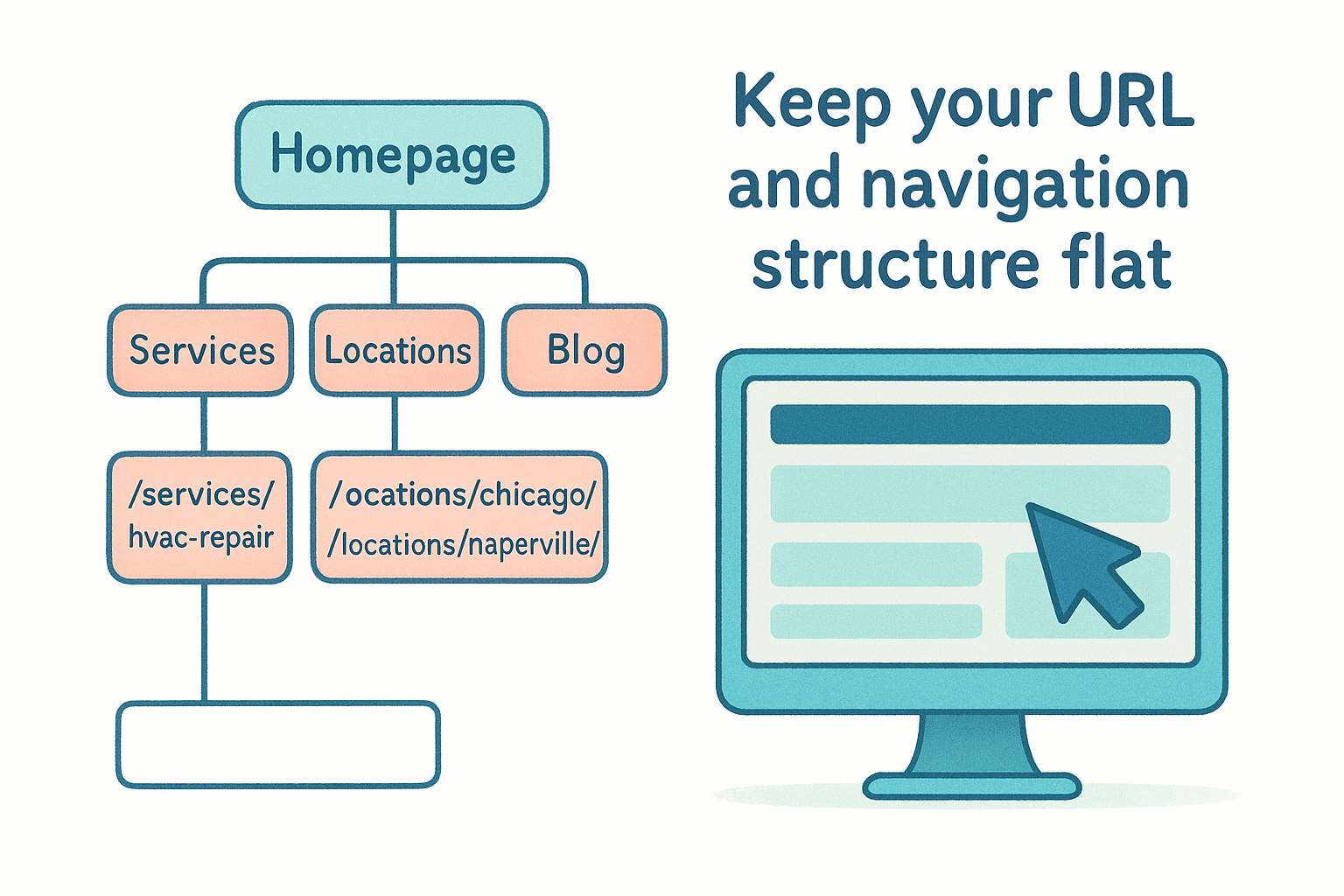
 Homepage (/)
  ├── Services (/services/)
  │     ├── /services/hvac-repair/
  │     └── /services/ac-installation/
  ├── Locations (/locations/)
  │     ├── /locations/chicago/
  │     └── /locations/naperville/
  └── Blog (/blog/)
Each location page should link back to relevant service pages, and each service page should link to the relevant location pages. This internal linking pattern tells Google which pages are related and reinforces the topical relevance of each section.
Submit your sitemap and fix crawl errors
Once your structure is clean, submit an XML sitemap
through Google Search Console
so Google knows exactly which pages to index. Most website platforms generate a sitemap automatically, typically found at yourdomain.com/sitemap.xml
. Verify that URL exists before submitting it.
A sitemap doesn't guarantee indexing, but it significantly reduces the time it takes Google to discover new and updated pages on your site.
After submitting, check the Coverage report
inside Search Console weekly for the first month. Fix any "Excluded" or "Error" pages immediately, because those are pages Google found but chose not to index. Common culprits include duplicate content, noindex tags placed by mistake
, and pages blocked inside your robots.txt
file. Resolving these early keeps your crawl budget focused on pages that actually matter to your rankings.
Step 4. Optimize pages for clicks and conversions
Getting your pages indexed is only half the job. Once your pages appear in search results, every title tag and meta description you write becomes a mini-ad competing for the searcher's attention. A well-optimized page in a small business SEO strategy earns clicks first, then converts those visitors into customers. Both outcomes depend on deliberate choices in your copy and page structure.
Write title tags and meta descriptions that earn clicks
Your title tag is the blue link text Google displays in search results, and it carries direct ranking weight . Keep it under 60 characters so it doesn't get truncated, include your primary keyword near the front, and make it specific enough that someone scanning results immediately understands what your page offers. Your meta description doesn't directly influence rankings, but it heavily influences click-through rate , which feeds back into how Google evaluates your page's relevance.
A title tag like "HVAC Repair in Chicago | Fast Service, Free Estimates" outperforms "Home Services - Chicago IL" every single time because it answers the searcher's question before they even click.
Use this template for each service or location page:
| Element | Format | Example |
|---|---|---|
| Title tag | [Primary keyword] + [Differentiator] + [Brand] | HVAC Repair Chicago |
| Meta description | [Benefit] + [What you offer] + [Call to action] | Need fast HVAC repair in Chicago? AcmeCo fixes most systems same day. Call now for a free estimate. |
Structure your page content to convert
Once a visitor lands on your page, page layout and copy flow determine whether they call, fill out a form, or leave. Lead with the most important information: what you do, where you serve, and why someone should choose you. Social proof elements like reviews, certifications, and customer counts build trust fast and reduce hesitation.
Place a clear call-to-action above the fold on every service and location page. "Call now," "Request a quote," or "Book online" should be visible without scrolling on both desktop and mobile. Each page should carry only one primary CTA so visitors don't face a choice they didn't come to make. Keep paragraphs short, use subheadings to break up content, and make sure your page loads in under three seconds on mobile.
Step 5. Win local SEO, including multi-location setups
Local SEO is where a well-executed small business SEO strategy pays off fastest, especially if you serve customers in specific cities or neighborhoods. Search results for location-based queries heavily favor businesses that Google can verify as legitimate, active, and geographically relevant . If you run multiple locations, the stakes are even higher because each location needs its own optimized presence to capture local search traffic independently.
Optimize your Google Business Profile
Your Google Business Profile(GBP) is the single most impactful free tool available for local search visibility. Fill out every field completely: business name, address, phone number, hours, service categories, and photos. Google uses this data to determine whether your business is relevant and trustworthy for local queries, so gaps in your profile directly translate to missed ranking opportunities.

An incomplete or inconsistent Google Business Profile is one of the fastest ways to lose local rankings to competitors who simply filled in the fields you left blank.
Add at least five photos when you first set up your profile, respond to every review within 48 hours , and post an update to your profile at least once per month. You can manage your profile directly through Google Business Profile.
Build dedicated location pages for each site
If your business serves more than one location, each location needs its own standalone page on your website, not a shared "Locations" page with a dropdown. Each location page should include the city name and primary service in the page title, a unique description of that location's services, the full address and phone number, an embedded Google map, and local customer reviews where possible.
Use this template for each location page:
| Element | What to include |
|---|---|
| Page title | [Service] in [City] + brand name |
| Opening paragraph | What you offer and which neighborhoods you serve |
| Address block | Full street address, phone number, and hours |
| Embedded map | Google Maps iframe for that specific location |
| Local social proof | Reviews or testimonials from customers in that city |
NAP consistency (Name, Address, Phone) across your website, GBP, and any third-party directories is non-negotiable. Even small discrepancies, such as "St." versus "Street," signal inconsistency to Google and can suppress your local rankings across all locations.
Step 6. Create content that earns rankings and AI cites
Content is the engine behind any small business SEO strategy that compounds over time. Google's ranking systems and AI Overviews both look for pages that directly answer specific questions , demonstrate real knowledge, and organize information in a way that's easy to parse. The businesses that consistently appear in both traditional results and AI-generated answers share one trait: their content is structured to be cited, not just read.
Match content format to search intent
Not every search needs a long-form article. A query like "how to clean commercial kitchen equipment" needs a step-by-step guide with numbered instructions , while a query like "commercial cleaning prices" needs a clear pricing breakdown or comparison table . Before you write anything, check the first page of Google for your target keyword and study the format of the top-ranking pages. That format signals exactly what structure Google already considers most useful for that type of search. Use this template to plan each piece of content before you start writing:
| Content element | What to decide |
|---|---|
| Target keyword | One primary phrase per page |
| Search intent | Informational, navigational, or transactional |
| Format | Guide, FAQ, list, comparison, or how-to |
| Word count | Match the depth of top-ranking competitors |
| Structured data | FAQ, HowTo, or Article schema where applicable |
Write content AI systems want to cite
AI Overviews and other AI-generated answers pull specific, clearly stated facts and direct answers from web pages. To get cited, write in a way that makes your answer easy to extract. Lead each section with a one-to-two sentence direct answer , then follow it with supporting details, examples, or data. This mirrors how AI systems scan pages for quotable content, and it also makes your writing cleaner for human readers at the same time.
If your content buries the answer three paragraphs deep, AI systems and impatient readers will both skip past it.
Add an FAQ section at the bottom of your service and location pages using real questions your customers ask. Mark these up with FAQ schema so Google can display them as rich results in search. Validate your schema before publishing using Google's Rich Results Test to confirm it's implemented correctly and eligible to appear.
Your next move
You now have a complete small business SEO strategy built for 2026: clear goals, tracked from day one, supported by focused keywords, a crawlable site structure, optimized pages, local SEO for every location, and content built to earn both rankings and AI citations. None of these steps require a massive budget , but they do require consistent execution in the right order.
Start with Step 1 today. Set up Google Search Console and Google Analytics 4 , define one to three concrete goals, and write your one-page plan before you touch anything else on your site. Every step after that becomes easier when you know exactly what you're measuring and why.
If you run multiple locations and want a team that handles the design, SEO, and ongoing updates for you, Multi Web Team builds and manages websites specifically for businesses like yours, so you can focus on running your locations instead of managing your web presence.










