


June 14, 2026

5 Local SEO Mistakes To Avoid for Multi-Location Brands

Running multiple locations means juggling multiple local search profiles, and even one oversight can quietly tank your visibility. The frustrating part? Most local SEO mistakes to avoid aren't complicated, they're just easy to miss when you're managing five, ten, or fifty locations at once. A wrong phone number here, a duplicate listing there, and suddenly an entire location disappears from Google's local results .

If your local rankings have stalled or certain locations aren't pulling their weight online, there's a good chance one of these common errors is the culprit. At Multi Web Team, we manage websites and local SEO for multi-location brands and franchises every day, so we see these mistakes show up constantly . This article breaks down five of the most damaging ones and gives you clear steps to fix each one .

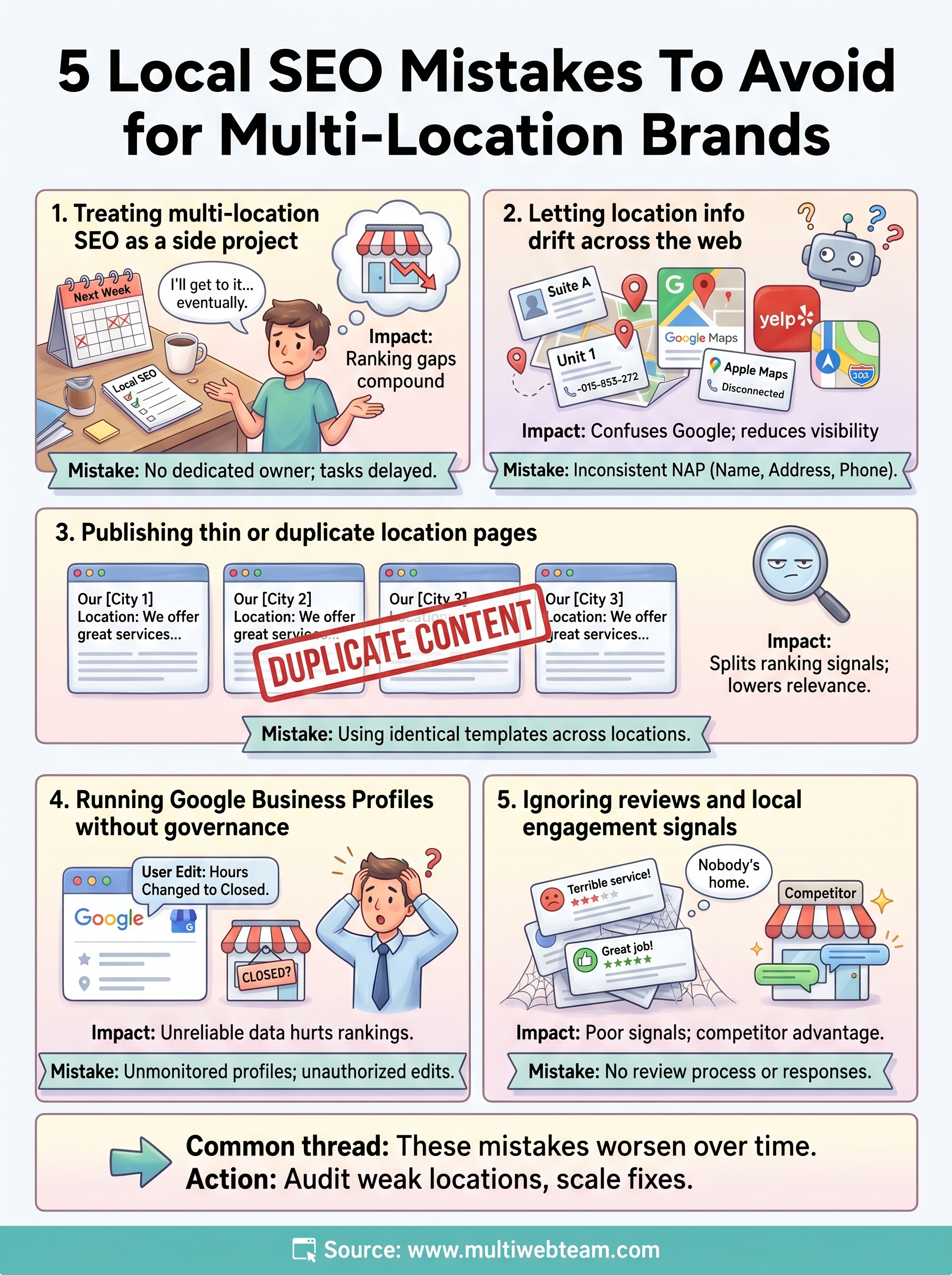
1. Treating multi-location SEO as a side project

Multi-location SEO requires dedicated, ongoing effort at the individual location level, not just a site-wide strategy. Most brands start with good intentions, but as the business scales, local SEO gets pushed aside. Someone handles it when there's time, and that usually means individual locations go weeks or months without any real attention .

What the mistake looks like

You have a general marketing plan, but no one specifically owns local SEO for each location. Common signs include location pages that haven't been updated in months, local listings nobody checks, and SEO tasks that keep moving to next week's list. This pattern is one of the most damaging local SEO mistakes to avoid because the damage accumulates quietly.

Why it hurts rankings for multi-location brands

Google's local ranking systems reward freshness, relevance, and consistent signals at the location level. When local SEO becomes an afterthought, signal gaps open up fast. A location with stale content and incomplete structured data will drop in local results even if your brand carries strong overall authority, because Google evaluates each location on its own merits.

Inconsistent attention across locations doesn't just stall growth, it creates ranking gaps that compound and get harder to close the longer you wait.

How to avoid it without adding headcount

You don't need to hire a dedicated SEO specialist per location. What you need is a clear process owner and a fixed review cadence across all locations. Many growing brands solve this by working with a managed web and SEO service that handles local optimization externally, keeping every location active without pulling operational staff away from running the business.

What to do this week

Pick one underperforming location and check three things: when the location page was last updated, whether anyone actively manages its local signals , and whether structured data is complete and accurate. That single audit will show you exactly where the process is breaking down.

2. Letting location info drift across the web

Every location you add creates new data points scattered across directories , data aggregators, and review platforms. Over time, addresses change and phone numbers get updated , but old information lingers in places you forgot to check. This is one of the most damaging local SEO mistakes to avoid as your brand grows.

What the mistake looks like

Your business name, address, and phone number appear differently across platforms. One directory lists an old suite number, another shows a disconnected phone line, and your Google Business Profile displays different hours than your website does.

Why it hurts rankings for multi-location brands

Google cross-references location data from multiple sources to verify your business is trustworthy. Conflicting signals tell Google it cannot confirm your details reliably, which directly reduces your local search visibility for that location.

Inconsistent NAP data across even a handful of directories can suppress a location's rankings regardless of how strong the rest of your SEO is.

How to avoid it with consistent data and structure

Run a full NAP audit across all major directories and data aggregators. Standardize every detail, down to suite number abbreviations, so your information matches exactly everywhere it appears online.

What to do this week

Search your business name and city on Google and scan the top five directory listings that appear. Fix every discrepancy you find before moving on to the next location.

3. Publishing thin or duplicate location pages

Many multi-location brands copy the same page template across every location, swapping only the city name. This shortcut creates near-duplicate content across your site, and it's one of the clearest local SEO mistakes to avoid as you scale.

What the mistake looks like

Your location pages share identical descriptions and the same boilerplate text , with only the city swapped out. Google treats these as competing copies of the same page, which splits your ranking signals and weakens every location's visibility.

Why it hurts rankings for multi-location brands

Google's systems reward unique, locally relevant content . Pages with no location-specific detail give Google no reason to surface them, and they give visitors no reason to stay or convert .

Thin location pages don't just underperform, they signal to Google that your site lacks local depth and relevance.

How to avoid it with location-specific content and UX

Build each page around real location details that are specific to that address and community, including:

  • Local team bios and photos
  • Neighborhood-specific service descriptions
  • Genuine customer reviews from that location

What to do this week

Pull up three of your location pages and compare them side by side. If they read as near-identical, prioritize adding unique, locally grounded content to each one before anything else.

4. Running Google Business Profiles without governance

With multiple locations, your Google Business Profiles can fall into disarray fast. Staff suggest edits, third parties claim listings, and critical profile details change without anyone on your team noticing.

What the mistake looks like

Your GBP listings show inconsistent categories, outdated photos, or wrong business hours across locations. Google automatically accepts many user-suggested edits, so customer-facing information can change before anyone flags it.

Why it hurts rankings for multi-location brands

GBP is one of the strongest local ranking signals Google uses. A profile with wrong categories or missing details tells Google your location data is unreliable. This is one of the clearest local SEO mistakes to avoid because the errors often happen with no action from your team.

An unmonitored GBP listing can have its address, hours, or category changed by Google or the public with no alert sent to you.

How to avoid it with a repeatable GBP system

Assign a single owner for GBP governance across all locations and run monthly audits to catch unauthorized edits before they compound into ranking problems.

What to do this week

Log into Google Business Profile Manager and review each location's primary category, hours, and photos. Flag anything that does not match your current, verified location data and correct it immediately.

5. Ignoring reviews and local engagement signals

Reviews are active ranking signals , not just social proof. When you stop actively managing your review presence across locations, you hand a significant local SEO advantage to competitors who stay engaged.

What the mistake looks like

No review request process exists, and responses to existing reviews are inconsistent or absent. Some locations accumulate months of unanswered negative reviews while others sit with fewer than ten total reviews despite being open for years.

Why it hurts rankings for multi-location brands

Google uses review quantity, recency, and response rate as local ranking signals. Locations with stale, sparse, or unacknowledged reviews rank lower, which makes ignoring reviews one of the clearest local SEO mistakes to avoid at scale.

A pattern of silence on reviews signals to both Google and potential customers that no one is minding the store at that location.

How to avoid it with a review and response workflow

Build a simple, repeatable process for each location: request reviews at the point of service, assign someone to respond within 48 hours, and track review counts and ratings monthly across all locations.

What to do this week

Check your worst-reviewed location on Google. Respond to every unanswered review this week, positive or negative, and set up a basic review request system before the week ends.

Next Steps

These five local SEO mistakes to avoid share a common thread: they all get worse the longer you leave them unaddressed. Each location you operate represents its own ranking opportunity, and every gap in your local SEO process costs you visibility, traffic, and real customers at that address.

Start with the audit tasks from each section above. Pick the location with the weakest performance, work through each checklist item, and treat it as your proof of concept before scaling your fixes across the rest of your portfolio. Small, consistent actions compound quickly when you apply them to every location with discipline.

If managing website updates, local SEO, and GBP governance across all your locations feels like more than your current team can absorb, Multi Web Team handles exactly that. Visit our multi-location website and SEO services to see how we help growing brands keep every location optimized without the overhead of an internal web team.

By cinchweb June 16, 2026
Boost local search visibility with the 13 best directories to list your business. Learn how to optimize profiles and manage citations to rank higher.
By cinchweb June 15, 2026
Compare 10 top small business website management services to find your best fit. Learn which agencies offer the SEO, security, and pricing model you need.
By cinchweb June 14, 2026
Find the right expert to boost your conversions. Discover the 11 best places to hire a landing page designer in 2026, from freelancers to specialized agencies.
By cinchweb June 12, 2026
Boost site speed and usability with 8 mobile website design tips. Learn to optimize navigation, simplify forms, and drive more conversions on mobile devices.
By cinchweb June 11, 2026
Build patient trust with these 6 healthcare website design tips. Optimize for mobile, ensure HIPAA compliance, and improve accessibility for your practice.
By cinchweb June 11, 2026
Get a clear breakdown of landing page design pricing. Compare market rates, see what drives costs, and learn how to budget for pages that actually convert.
By cinchweb June 11, 2026
Learn how to design a restaurant website that converts. Optimize your mobile layout, menus, and local SEO to turn website visitors into hungry diners.
By cinchweb June 8, 2026
Rank higher in the Map Pack. This local business seo guide shows you how to optimize profiles, fix NAP data, and manage reviews for all your locations.
By cinchweb June 7, 2026
Win new patients with these 12 medical practice website design tips. Learn to optimize multi-location SEO, mobile speed, and CTAs to grow your practice.
By cinchweb June 6, 2026
Learn how to manage online reviews across all locations. Build a system to monitor feedback, use response templates, and boost your local SEO rankings.
SHOW MORE








