
15 Local SEO Ranking Factors That Matter Most in 2026
Google uses a specific set of local SEO ranking factors to decide which businesses show up in the map pack and local search results, and which ones get buried. If you run a multi-location business or franchise, understanding these factors isn't optional. It's the difference between your locations getting found by nearby customers or losing them to a competitor down the street.
The core signals haven't changed dramatically over the years: proximity, relevance, and prominence still form the foundation. But how Google weighs and interprets those signals has evolved. Reviews carry more nuance now. Google Business Profile optimization has become more granular. And the way your website supports each individual location matters more than ever, something we deal with daily at Multi Web Team, where we build and manage websites specifically for multi-location businesses that need each location to rank locally .
This guide breaks down the 15 ranking factors that have the biggest impact on local search performance right now. No filler, no speculation, just the signals that actually move the needle based on how Google's local algorithm works in 2026. For each factor, you'll get a clear explanation of what it is, why it matters, and what you can do about it. Whether you're managing 3 locations or 300, these are the priorities worth your attention .
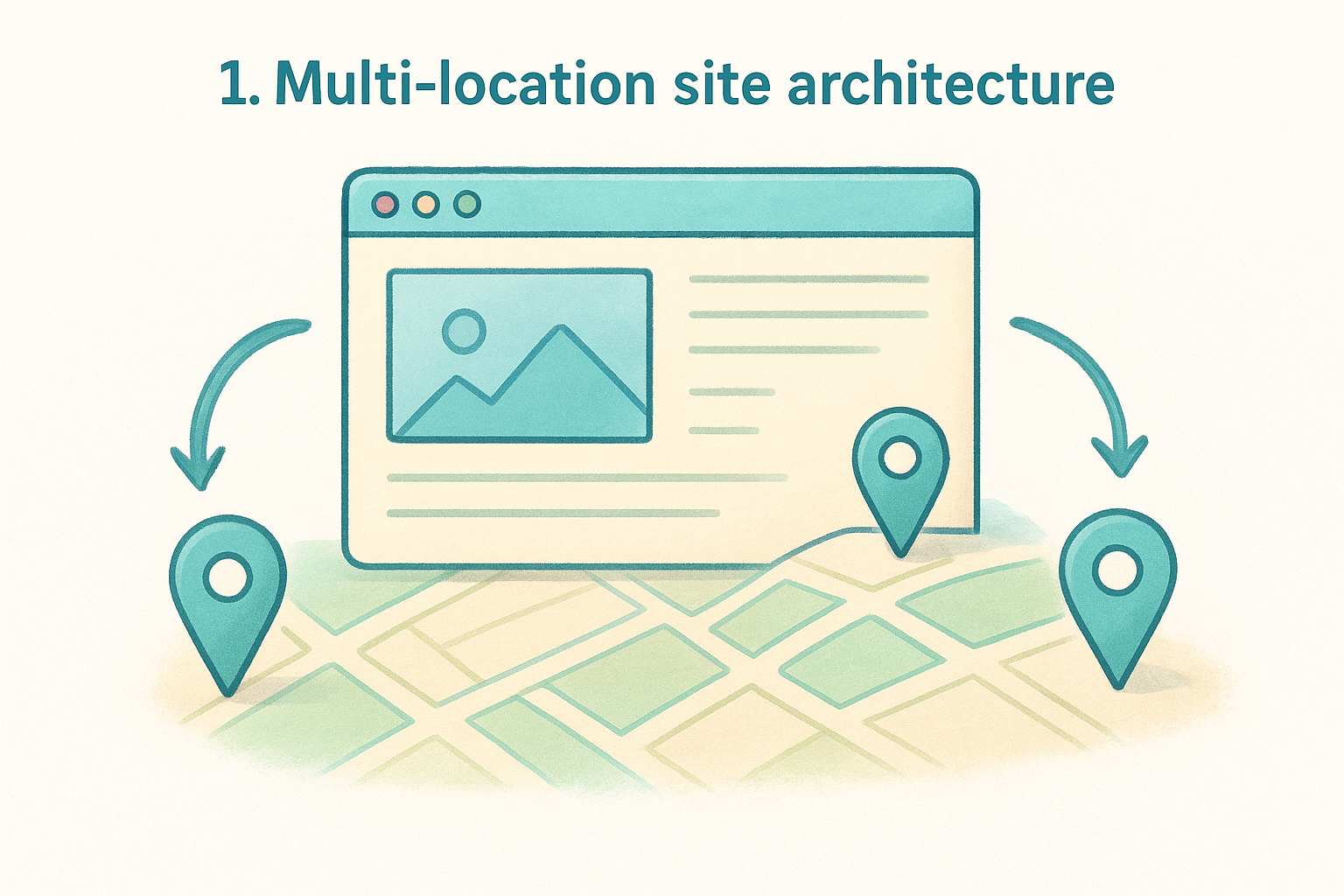
1. Multi-location site architecture
Your website's structure is the foundation every other local SEO ranking factor builds on. When Google crawls your site, it needs to find clear, separate pages for each location you operate, and it needs to understand how those pages relate to each other. A poorly structured multi-location site splits your authority, confuses crawlers, and makes it nearly impossible for individual locations to compete in local search results.
Why it matters in 2026
Google's ability to understand geographic relevance has grown significantly. It now connects location-specific signals across your entire site, not just individual pages. If your site architecture doesn't make each location distinct and crawlable , Google can't assign proper relevance signals to those locations when someone searches nearby. For multi-location businesses, this is one of the highest-impact local SEO ranking factors to get right because it shapes how every location performs, all at once.
A flat or disorganized site structure doesn't just hurt rankings for one location; it dilutes authority across all of them at the same time.
What to do
Build a consistent URL structure that places each location in its own subdirectory, such as yoursite.com/locations/city-name/. Each location page needs its own unique, location-specific content , not a template duplicated across 10 cities with only the city name swapped out. Google treats that kind of thin duplication as low-quality content, and it will suppress those pages accordingly.
- Use a parent Locations page that links to every individual location page
- Give each location page a unique title tag, H1, and meta description that reference the specific city or neighborhood
- Avoid subdomains for individual locations unless you have a strong technical reason; subdirectories consolidate authority more effectively and are easier to manage at scale
How to track progress
Use Google Search Console to monitor which location pages are indexed and how they perform for geo-specific queries . Filter by page URL in the Performance report to see impressions and clicks broken down by location subdirectory. This tells you which locations are gaining traction and which ones Google is largely ignoring.
Run a crawl audit periodically to confirm that all location pages are fully discoverable , indexed correctly, and free of errors like redirect chains or broken internal links that quietly suppress local search visibility over time.
Common mistakes to avoid
The most common mistake is treating a multi-location site like a single-location site with a dropdown menu. Another is building thin location pages that only contain an address, phone number, and a map embed. Google needs enough substantive, location-specific content on each page to connect it meaningfully to local search intent in that area.
2. Dedicated service pages for each location
A dedicated service page for each location goes beyond listing what you offer. It gives Google a clear, specific signal that your business provides a particular service in a particular city , and that combination is what triggers relevance in local search results.
Why it matters in 2026
Google has gotten better at matching search queries to highly specific pages. If someone searches "HVAC repair in Dallas," a generic services page that mentions Dallas once won't compete with a page built entirely around HVAC repair in Dallas . These dedicated pages let you align your content directly with local search intent , which makes them one of the most actionable local SEO ranking factors you control directly.
Combining a location with a service on a single dedicated page gives Google exactly the relevance signal it needs to rank you for that specific query.
What to do
Build individual pages for each service-and-location combination that matters to your business. Each page should include location-specific details like neighborhood references, service area boundaries, or local context rather than just swapping a city name into a template. Link each service page back to its parent location page to reinforce the geographic connection.
How to track progress
Monitor keyword rankings for service-plus-city queries using Google Search Console. Look for impressions on those specific terms to confirm Google is indexing the pages correctly and surfacing them for relevant local queries .
Common mistakes to avoid
Avoid building identical service pages across locations with only the city name changed. Google identifies this as thin content and suppresses those pages in results. Each page needs genuinely unique content that reflects the specific location and service combination you're targeting.
3. Geographic keyword relevance on the page
Geographic keyword relevance is about more than dropping a city name into your content. Google analyzes how naturally and how thoroughly your page connects a specific service to a specific location, and that analysis covers your title tag, headings, body copy, image alt text, and URLs. If your location pages lack clear geographic signals throughout , they won't compete for the local queries that drive real foot traffic and calls.
Why it matters in 2026
Google's understanding of geographic content has matured considerably. It now picks up on implicit location signals like neighborhood names, nearby landmarks, and regional terminology, not just the city name in your H1. This means geographic keyword relevance is one of the local SEO ranking factors where natural, specific signals outperform obvious keyword repetition. Pages written for real people in a specific area consistently outrank pages that read like keyword lists.
Writing for a specific community rather than a keyword pattern gives Google more signals to work with and gives readers a reason to trust you.
What to do
Use location-specific language throughout the page and make sure the city or neighborhood appears in your title tag, H1, and within the first 100 words of body copy. Reference surrounding areas where they fit naturally.
- Include geo-modified service terms in at least one subheading
- Mention nearby neighborhoods or landmarks where relevant
- Write descriptions that reflect the actual local context, not just a swapped city name
How to track progress
Check Google Search Console to see which geographic queries your location pages are generating impressions for. Growth in city-specific impressions confirms that your on-page keyword signals are registering with Google's local algorithm.
Common mistakes to avoid
Avoid repeating the city name in every sentence. Google reads this as keyword stuffing , which suppresses rankings rather than improving them. Keep the language natural and focused on genuinely serving someone searching in that location.
4. Internal linking across locations and services
Internal linking is how you transfer authority and context between pages on your site. For multi-location businesses, a deliberate internal linking structure tells Google how your location pages, service pages, and supporting content relate to each other, which strengthens every page in the process rather than leaving each one isolated.
Why it matters in 2026
Google follows internal links to understand site structure and topical relationships . When you link your Chicago location page to your Chicago-specific service pages, and those service pages link back to the parent location page, you create a clear geographic and topical cluster. This clustering is one of the local SEO ranking factors that helps Google assign stronger relevance to each page within that cluster.
A well-linked site passes authority to every location page systematically rather than concentrating it in a few top-level pages.
What to do
Start with your main Locations hub page and confirm it links to every individual location page. Then link each location page to the service pages specific to that location. Use descriptive, keyword-aware anchor text like "plumbing services in Phoenix" rather than generic text like "click here."
- Link related service pages to each other where the connection is natural
- Include a link back to the location page from every service page under that location
- Add contextual links within body copy, not just navigation menus
How to track progress
Use Google Search Console's Links report to see which pages are receiving the most internal links. Pages with strong internal link counts tend to get crawled more frequently and rank more competitively , so any location page that appears underlinked warrants attention.
Common mistakes to avoid
Avoid relying entirely on navigation menus for internal linking. Menu links carry less contextual weight than in-content links. Also, skip generic anchor text; it wastes the relevance signal that descriptive anchor text provides.
5. LocalBusiness schema and structured data
Schema markup gives Google machine-readable data about your business that goes beyond what it can infer from plain text alone. When you add LocalBusiness schema to each location page, you tell Google the business name, address, phone number, hours, and service area in a format it can process without interpretation. This removes ambiguity and strengthens the relevance signals that search engines weigh as part of their local SEO ranking factors .

Why it matters in 2026
Google uses structured data to populate rich results and knowledge panels , and it cross-references your schema against other signals like your Google Business Profile. Consistent, accurate schema across every location page signals that your business data is reliable and verified , which directly influences how Google determines prominence in local search.
Schema doesn't replace good content, but it gives Google a faster, cleaner path to understanding what each location page represents.
What to do
Add LocalBusiness
schema to every location page following Google's structured data guidelines. Each instance should include the business name, full address, phone number, hours, and the specific @type
that matches your business category.
- Match schema data exactly to your Google Business Profile details
- Include
openingHoursSpecificationfor each day to support hours-based filtering in search - Use
hasMapto link directly to your Google Maps listing
How to track progress
Run each location page through Google's Rich Results Test to confirm your schema is valid and error-free . Google Search Console's Enhancements report will also flag any structured data issues that need correction across your site.
Common mistakes to avoid
Avoid copying identical schema blocks across all locations without updating the address, phone number, and hours for each one. Mismatched data between your schema and your Google Business Profile sends conflicting signals that can suppress your rankings in local results.
6. Google Business Profile primary category
Your primary category on Google Business Profile is one of the most direct signals you send to Google about what your business actually does. Google uses this category to determine which searches your profile is eligible to appear for, and choosing the wrong one, or a vague one, removes you from the running for the searches that matter most to your customers.
Why it matters in 2026
The primary category functions as a relevance filter inside Google's local algorithm. When someone searches "pizza restaurant near me," Google looks at the primary category of every business in the area to determine which ones qualify as relevant results. This makes it one of the most direct local SEO ranking factors you can control on your Google Business Profile, and one where precision pays off significantly more than a broad or approximate choice.
Your primary category defines which search queries your profile competes for, so an imprecise choice locks you out of the searches your customers are actually running.
What to do
Select the most specific category that accurately reflects your core business offering. Google provides hundreds of options, so dig past the obvious broad categories. A "Mediterranean Restaurant" outranks a generic "Restaurant" for Mediterranean food searches because the specificity matches the query more closely. You can add secondary categories to cover additional services, but your primary category should always reflect your single most important business function.
How to track progress
Monitor your Google Business Profile Insights for search query data to see which queries trigger impressions for your profile. If your core service terms are not generating impressions after you update your primary category , that is a signal the category may still be too broad.
Common mistakes to avoid
Avoid selecting a primary category based on what sounds prestigious rather than what your customers actually search for. Switching your primary category frequently also sends inconsistent signals to Google, so get it right initially and make changes only when your business offering genuinely shifts.
7. Google Business Profile completeness
A complete Google Business Profile signals to Google that your listing is active, trustworthy, and worth surfacing to nearby searchers. Google rewards profiles that fill out every available field because more data means fewer gaps for Google to fill in on its own, and that translates directly into stronger local rankings.
Why it matters in 2026
Google's local algorithm treats profile completeness as a quality signal . An incomplete profile forces Google to make inferences about your business, which introduces uncertainty into its ranking decisions. A fully filled-out profile removes that uncertainty and gives Google consistent, verified data to work with, making completeness one of the more straightforward local SEO ranking factors you can address right now.
A profile that answers every question Google provides gives searchers and the algorithm exactly what they need without leaving anything open to interpretation.
What to do
Fill in every available field on your Google Business Profile , including business description, services, products, attributes, and photos. Your description should use natural language to describe your business clearly within the 750-character limit , front-loading the most important information in the first two sentences.
- Add at least 10 photos, including interior, exterior, and team images
- List every service you offer using Google's services section
- Select all relevant attributes that apply to your specific location
How to track progress
Check your profile completeness score inside Google Business Profile Manager regularly. Google highlights missing fields directly in the dashboard, so you can identify exactly where gaps remain and close them systematically across all your locations.
Common mistakes to avoid
Avoid leaving your business description blank or filling it with vague promotional language that never explains what your business actually does. Skipping the services and attributes sections is equally damaging because those fields feed directly into Google's relevance filtering for category-specific and service-specific searches.
8. Accurate business hours and openness
Your business hours affect more than your listing details. Google filters search results based on whether a business is currently open, so incorrect or outdated hours can remove your locations from results at the exact moment nearby customers are ready to act.
Why it matters in 2026
Hours accuracy is one of the local SEO ranking factors that directly controls whether you appear in filtered searches. Google's "open now" filter excludes any business with incomplete or wrong hours from those filtered results entirely. Google also flags listings with suspected inaccuracies, which erodes trust before a customer even visits your site.
Being excluded from "open now" results means losing customers at their highest point of intent.
What to do
Update your Google Business Profile hours for every location to match your real schedule. Add special hours for holidays and closures before they happen, not after.
- Mirror your hours exactly across your website, GBP, and third-party directories
- Schedule holiday hours at least two weeks in advance
- Use GBP's special hours feature for any temporary schedule changes
How to track progress
Review your GBP dashboard after every update to confirm hours published correctly for each location.
Check your profile insights for drops in calls or direction requests around any date when hours changed, since a sudden decline often indicates a mismatch that pushed customers elsewhere instead.
Common mistakes to avoid
Avoid leaving holiday hours blank and letting Google fill the gap on its own. Never publish hours based on preference rather than your actual operating schedule , since inaccurate hours cost you rankings and customer trust at the same time.
- Do not ignore Google's suggested hour edits inside your GBP dashboard
- Never leave hours unreviewed after expanding or adjusting location schedules
9. NAP consistency across the web
NAP stands for name, address, and phone number. When these three pieces of data appear differently across your website, Google Business Profile, directories, and social profiles, Google treats those discrepancies as conflicting signals. The result is reduced confidence in your listing's accuracy, which directly weakens your position in local SEO ranking factors that depend on prominence and trust.
Why it matters in 2026
Google cross-references your business data across dozens of sources when evaluating how trustworthy and prominent a local listing is. Even minor inconsistencies, like "St." on your website versus "Street" on Yelp, create enough noise to dilute your ranking signals. For multi-location businesses , the risk multiplies because each location carries its own set of data that must stay consistent everywhere it appears.
A single mismatched phone number on a major directory can undermine the authority of an otherwise well-optimized location.
What to do
Audit every directory listing for each location and correct any inconsistency in how your business name, address, and phone number appear. Use the exact same format across all platforms.
- Choose one standard format for your address and apply it everywhere
- Ensure your GBP data matches your website's contact page precisely
- Submit corrections to major aggregators like Data Axle and Neustar, which distribute your data to dozens of downstream directories automatically
How to track progress
Search your business name plus city periodically and review the top directory results to spot any outdated or mismatched listings. Pay attention to older directories that may still carry previous addresses or phone numbers from before a location moved or changed numbers.
Common mistakes to avoid
Avoid listing a tracking phone number on directories if it differs from the number on your GBP. Never leave old listings unclaimed when your business moves, since unclaimed listings with stale data continue circulating and pulling your rankings down.
10. Address, service area, and map pin
Your physical address, service area settings, and map pin placement work together to tell Google exactly where your business operates and which searchers it should serve. When any of these three elements is wrong, Google struggles to match your listing to the right local searches, and you lose visibility in the areas your business actually covers.
Why it matters in 2026
Google uses address and service area data to determine proximity, which is one of the three core local SEO ranking factors alongside relevance and prominence. A map pin placed at the wrong location means Google calculates your distance to searchers incorrectly, which knocks you out of results for nearby customers who should be finding you first.
Proximity calculations only work in your favor when your address, service area, and pin all point to the same accurate location.
What to do
Confirm that your map pin sits directly on your physical storefront or office , not on a street corner or parking lot nearby. In your Google Business Profile, set a service area that reflects the actual geographic range you serve, using cities, counties, or zip codes rather than a radius, since radius settings are less precise.
- Remove the physical address from your GBP listing only if you are a true service-area business with no customer-facing location
- Keep your service area limited to places you genuinely serve rather than inflating it to chase impressions in areas you cannot realistically cover
How to track progress
Check your Google Business Profile map pin placement by opening your listing in Google Maps and confirming the pin lands on your exact building. Review your service area settings quarterly to make sure they still reflect your current coverage after any business expansion or contraction.
Common mistakes to avoid
Avoid listing a P.O. box or virtual office address as your primary business address. Google prohibits this and will suspend listings that violate its guidelines. Never set a service area so wide that it covers cities where you have no real presence, since Google penalizes listings that appear to game geographic reach.
11. High star ratings and sentiment
Your average star rating is one of the first things a searcher sees when your listing appears in the map pack. It shapes their decision before they click, and it shapes Google's ranking decisions at the same time. Low ratings and negative sentiment in review text both push your listing down in local search results because Google treats them as signals that your business may not deliver a reliable experience.
Why it matters in 2026
Star ratings are among the most visible local SEO ranking factors in Google's algorithm, and their influence has grown as Google increasingly reads review text for sentiment signals alongside the numeric score. A business with a 4.7-star average consistently outperforms a competitor sitting at 3.9, even when other factors are comparable.
Google treats your average star rating as a proxy for customer satisfaction, and that proxy directly influences your position in local results.
What to do
Ask customers for reviews immediately after a positive interaction while the experience is fresh. Train your staff to mention the review request in person, and follow up with a direct link to your Google Business Profile review form via text or email.
- Resolve service issues before they become public complaints
- Respond to every review, positive and negative, to show Google and customers that your business is engaged
- Use Google's review policies to flag and remove reviews that violate guidelines
How to track progress
Monitor your average star rating across each location inside your Google Business Profile dashboard monthly. Track changes after any review request campaign to confirm the effort is translating into higher scores.
Common mistakes to avoid
Never incentivize reviews with discounts or gifts. Google prohibits review gating and incentivized reviews , and violations can result in listing penalties that erase the gains you worked to build.
12. Review volume, recency, and velocity
Google doesn't just look at how many reviews your locations have. It looks at how recently those reviews came in and whether new ones arrive at a steady pace. A listing with 200 reviews, all from three years ago, signals less activity than one with 80 reviews that arrive consistently every month.

Why it matters in 2026
Review volume and recency are among the most dynamic local SEO ranking factors Google monitors in real time. A sudden drop in new reviews tells Google your business may be less active or less popular than it once was. Conversely, a consistent flow of fresh reviews reinforces that your location stays relevant to current customers and keeps Google's confidence in your listing high.
Steady review velocity matters more than occasional spikes because it signals ongoing customer activity rather than a one-time push.
What to do
Build a repeatable system for requesting reviews so they arrive on a regular schedule rather than in bursts. Send review request messages via SMS or email within 24 hours of a completed transaction, when the customer's experience is still fresh. Train your team at every location to make the request part of the standard closing interaction with customers.
How to track progress
Check the date of your most recent reviews for each location weekly. If any location goes two or more weeks without a new review, that's your signal to reinforce the request process at that specific location. Track your monthly review count per location over time to spot trends and catch any location that's falling behind.
Common mistakes to avoid
Never run a mass review request campaign that floods your profile with dozens of reviews inside a single week. Google treats sudden, unnatural spikes in review velocity as a manipulation signal and may suppress or remove those reviews entirely.
13. Review text that proves what you do
Review text gives Google something star ratings alone cannot: specific language that connects your business to real services in a real location. When customers mention your service by name or reference your city in their review, Google extracts those keyword signals and uses them to strengthen the relevance of your listing for related searches.
Why it matters in 2026
This is one of the local SEO ranking factors that most businesses overlook entirely. Google's natural language processing now reads review content to understand what services you provide and where , using that data to match your listing against more specific search queries. A review that says "best roof repair in Tampa" carries more ranking weight than five generic "great service!" reviews.
The language your customers use in reviews can reinforce the same keyword signals you're building into your website and Google Business Profile.
What to do
Prompt customers to mention the specific service they received and the location where they received it when you ask for a review. You can't dictate their words, but you can frame the request around details: "Tell us what brought you in and how we helped."
- Respond to reviews by echoing the service and location naturally in your reply
- Flag reviews that mention competitors or contain irrelevant content using Google's review removal tools
How to track progress
Read through your new reviews weekly and note whether customers mention specific services or locations. If reviews stay generic, adjust your review request messaging to prompt more descriptive responses from future customers.
Common mistakes to avoid
Never write fake reviews that stuff keywords into review text. Google identifies patterns in inauthentic review language and will remove or penalize listings that rely on them.
14. Local authority through citations, mentions, and links
Local authority is how Google measures your business's credibility and prominence across the web. Citations (directory listings that include your NAP), unstructured mentions in articles or local news, and inbound links from relevant websites all tell Google that your business is recognized beyond your own website and GBP listing.
Why it matters in 2026
Authority signals sit at the core of Google's prominence calculation, which is one of the three foundational local SEO ranking factors alongside relevance and proximity. A business with strong citations, mentions in local publications, and links from relevant local sites signals to Google that it is genuinely established in its community , not just optimized on paper.
Prominence in Google's local algorithm is earned externally, not built only on your own website.
What to do
Focus on building authority from sources that are relevant to your industry and geography . Get listed on major data aggregators and claim your profiles on prominent directories like Google, Yelp, Apple Maps, and Bing Places. Pursue local backlinks from chambers of commerce, local news outlets, and industry associations that cover your service area.
How to track progress
Monitor your inbound link profile using Google Search Console's Links report, which shows which external sites link to your location pages. Track how your citation presence grows over time by searching your business name periodically and noting which new directories surface in results.
Common mistakes to avoid
Avoid building bulk citations on low-quality directories that have no relevance to your business or location. Chasing volume over quality dilutes your authority signals rather than strengthening them, and links from spammy or irrelevant sources can actively harm your local rankings rather than helping them.
15. Behavioral signals and website experience
Google monitors how users interact with your listing and your website to evaluate whether your business is actually delivering on what it promises in search. Click-through rate, time on page, bounce rate, and mobile usability all feed into Google's broader assessment of whether your pages are worth ranking, and for multi-location businesses, these signals compound across every individual location page on your site.
Why it matters in 2026
Behavioral signals sit quietly behind the scenes of most local SEO ranking factors , but their influence is real. When searchers consistently click your listing and spend time on your page before converting, Google interprets that pattern as a quality signal. When they click and immediately return to the search results, Google treats that as a sign your page did not deliver what the searcher needed.
A high bounce rate on a location page tells Google that page is failing the searcher, and repeated failures push that page down in rankings over time.
What to do
Ensure every location page loads in under three seconds on mobile devices, since the majority of local searches happen on phones. Structure each page so the most critical information, your address, hours, and primary service, appears immediately without scrolling. Use clear calls to action like a phone number and directions link in a visible position on every location page.
How to track progress
Use Google Search Console to review click-through rates by location page and identify which pages underperform relative to their impressions. Google Analytics shows you average session duration and bounce rates broken down by page, giving you a direct read on which location pages are losing visitors.
Common mistakes to avoid
Avoid building location pages that load slowly due to oversized images or unnecessary scripts. Never hide your phone number behind a form that forces users to work to contact you, since friction at that stage sends visitors back to search results and damages your behavioral signals over time.
Where to focus next
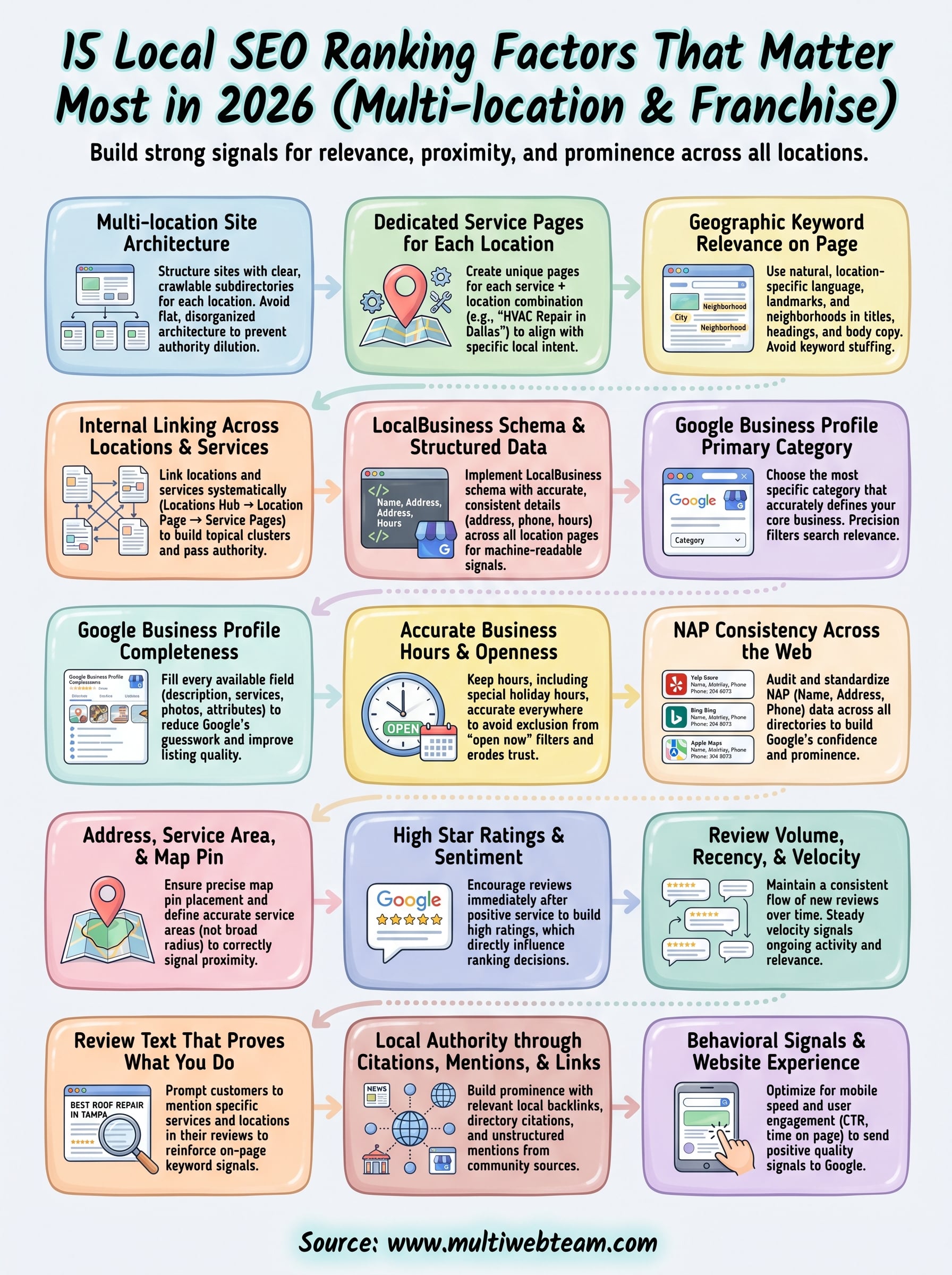
All 15 local SEO ranking factors covered in this guide connect to the same goal: giving Google enough clear, consistent, and trustworthy signals to rank your locations above the competition. Start with your site architecture and Google Business Profile , since those two areas affect every other factor on the list. Fix your NAP consistency, build out dedicated location and service pages, and get a steady review system running at each location. From there, layer in schema, internal linking, and behavioral improvements to compound the gains.
Multi-location businesses face a scale problem that single-location competitors don't. Every factor you fix for one location needs to be replicated across all of them, and that takes time and consistent attention. If you're managing multiple locations without a dedicated web team, Multi Web Team builds and manages websites specifically for businesses like yours, handling the ongoing updates and local SEO work so your locations stay competitive without pulling you away from running the business.










