
How To Manage Online Reviews: A Step-by-Step Strategy Guide
A single one-star review can steer dozens of potential customers toward your competitor. Multiply that across five, ten, or fifty locations, and the stakes get real fast. Knowing how to manage online reviews isn't optional anymore, it's a core part of running a business that people actually find and choose. For multi-location businesses and franchises , the challenge is amplified because each location builds its own reputation on Google, Yelp, and other platforms independently.
The problem is that most business owners don't ignore reviews on purpose. They just run out of hours in the day . Between updating menus, managing staff, and keeping operations tight across every location, review management falls to the bottom of the list. But here's what makes it worth prioritizing: 88% of consumers trust online reviews as much as personal recommendations, and Google factors review signals directly into local search rankings. Your reviews shape both perception and visibility.
At Multi Web Team, we work with multi-location businesses every day, optimizing their websites and local SEO so each location gets found. But even the best-optimized site loses ground if the reviews backing it up are sparse, negative, or unanswered. That's why we put this guide together. Below, you'll find a step-by-step strategy for monitoring, responding to, and generating reviews across all your locations, practical moves you can start implementing this week. No fluff, just a clear system that scales with your business.
What online review management covers
Online review management is more than just replying to complaints . It's an ongoing system that covers how your business monitors, responds to, generates, and learns from customer feedback across every platform where your locations appear. When you understand what the full scope looks like , you can build a process that handles it consistently rather than reacting after the damage is done. For multi-location businesses especially, knowing how to manage online reviews means having that system run at scale, not location by location through manual effort.
Monitoring: staying aware of new reviews
Most businesses only see reviews when a customer directly complains or when someone happens to mention it in passing. Effective monitoring means setting up systems that catch every new review across Google, Yelp, Facebook, and industry-specific platforms the moment they go live. For a single location, manual checking might work. For five or more, you need automated alerts and centralized dashboards so nothing slips through unnoticed.
If you miss a negative review for two weeks, the customer who wrote it has already moved on, and so have the potential customers who read it.
Responding: how you reply defines your brand
Your response to a review, whether it's a five-star compliment or a one-star complaint, is public communication . Every person reading that review also reads how you handled it. A prompt, professional response to a negative review often matters more to prospective customers than the original complaint itself. Ignoring positive reviews is also a missed opportunity to reinforce loyalty and show that your business pays attention.
Responding well requires a clear set of guidelines so that anyone managing your locations, whether that's a franchise owner, a location manager, or a marketing coordinator, can reply in a consistent brand voice . That means response templates, tone guidelines, and a defined timeline for how quickly responses go out after a review is posted.
Generating: actively building your review base
Satisfied customers rarely leave reviews unless someone asks them to . Your review volume directly affects how Google ranks your locations in local search results, and a business with 12 reviews looks far less credible than one with 200, even if both average 4.8 stars. Building review volume means creating a repeatable, compliant process for asking customers at the right moment through the right channel.
The word " compliant " matters here. Platforms like Google explicitly prohibit incentivizing reviews or selectively asking only customers you know are happy. The goal is consistent volume from a genuine cross-section of customers , not a wave of five-star ratings that looks manufactured and can trigger platform penalties.
Analyzing: making reviews work beyond reputation
Reviews contain direct, unfiltered feedback about what your business does well and where it falls short. Across dozens or hundreds of reviews per location, patterns emerge: staff members get mentioned repeatedly, wait times keep coming up, or a specific product draws consistent complaints. Treating that data as an operational feedback loop rather than just a PR task is what separates businesses that improve from those that only manage appearances.
At the analysis stage, you compare locations against each other, spot trends over time , and feed those insights back into day-to-day operations . That's where review management starts paying dividends well beyond your star rating.
Step 1. Choose your priority platforms
You can't manage reviews everywhere at once, and spreading your attention too thin means doing nothing well. The first step in how to manage online reviews is identifying which platforms actually matter for your locations . For most multi-location businesses, that list is shorter than you'd expect, but the platforms you choose need to align with your industry, your customer base, and where Google's local algorithm picks up signals .
Google Business Profile reviews carry the most weight for local search rankings, so if you only commit to one platform right now, make it that one.
The platforms that drive the most local visibility
Google Business Profile is non-negotiable for every location. Reviews on your Google listing feed directly into how your business appears in Google Maps and local search results. Beyond Google, the platforms that matter most depend on what you sell and who your customers are. A restaurant group needs Yelp and TripAdvisor in their mix. A fitness franchise should monitor Facebook and Google . A healthcare or dental practice needs to track Healthgrades and Zocdoc alongside Google.

Here's a quick reference to match platforms to common multi-location industries:
| Industry | Priority Platforms |
|---|---|
| Food and beverage | Google, Yelp, TripAdvisor, Facebook |
| Fitness and wellness | Google, Facebook, Yelp |
| Retail | Google, Facebook, Yelp |
| Healthcare | Google, Healthgrades, Zocdoc |
| Home services | Google, Yelp, Angi |
| Hospitality | Google, TripAdvisor, Booking.com |
How to audit your current platform presence
Before you build a management system, spend 30 minutes searching each of your locations by name and city across the platforms listed above. Note where your business already appears, check how many reviews each listing has , and flag any listings with incorrect addresses, phone numbers, or hours. Outdated or unclaimed listings damage your reputation before a single customer reads a review.
Claim and verify every listing you find. Google's verification process for Google Business Profile typically involves a postcard, phone call, or video verification depending on your business type. Once you claim a listing, you control the details and can respond to reviews directly , which is the foundation every other step in this guide builds on. Repeat this audit for each of your locations, not just your flagship.
Step 2. Set up monitoring and alerts
Once you know which platforms your locations live on, the next move is making sure new reviews reach you automatically rather than requiring manual checks. Without alerts, a negative review can sit unanswered for days, which signals to anyone reading it that your business doesn't pay attention. Part of learning how to manage online reviews is building a system that keeps you informed without eating hours out of your week.
A review left unanswered for more than 48 hours sends a clear message to prospective customers: no one is watching.
Configure your platform notifications
Google Business Profile lets you turn on email notifications for every new review directly inside your account settings. Log in at business.google.com, navigate to your profile, select "Notifications," and check the option for new reviews. Do this for every location separately , since notification settings are not shared across a multi-location account.
For platforms like Yelp and Facebook, you'll find similar settings in the business account dashboard under notification preferences. Spend 15 minutes going through each platform you identified in Step 1 and enabling every available review alert. This small upfront investment pays off every single week after you complete it.
Build a simple review tracking log
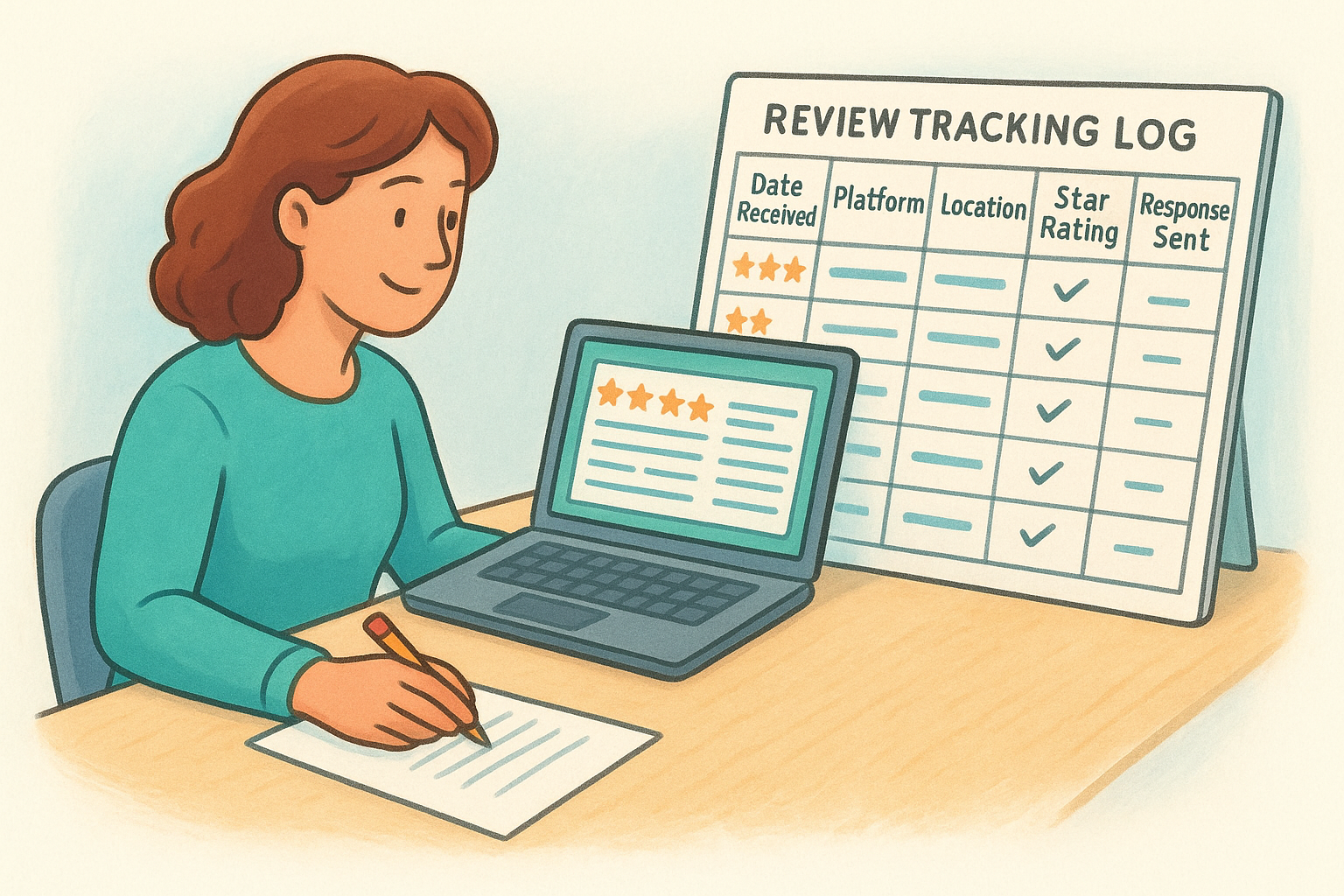
Notifications tell you a review arrived. A tracking log shows you the full picture across all your locations over time. A basic spreadsheet works well for this, and you can share it with anyone managing responses at each location. Track these columns for every review that comes in:
| Column | What to record |
|---|---|
| Date received | When the review was posted |
| Platform | Google, Yelp, Facebook, etc. |
| Location | Which of your locations it references |
| Star rating | 1 through 5 |
| Key topic | What the review is primarily about |
| Response sent | Yes / No / Date |
Reviewing this log weekly gives you a real-time read on sentiment across every location, not just the loudest complaints. It also helps you spot if one location is consistently pulling lower ratings , which turns into a targeted conversation with that team rather than a surprise you catch six months down the road.
Step 3. Respond fast with a clear playbook
Speed and consistency are the two pillars of a strong response strategy. Part of learning how to manage online reviews is recognizing that your response time and tone affect how prospective customers perceive your brand just as much as the original review itself. The goal isn't a perfect reply every time; it's reliable, prompt engagement that signals your business is present and accountable across all your locations.
Responding within 24 hours tells both the reviewer and anyone reading afterward that your business takes customer feedback seriously.
Build your response templates
Templates don't mean robotic replies. They give your team a starting framework that anyone in your organization can personalize quickly without going off-brand. A good template includes a greeting, an acknowledgment of specific feedback, and a clear next step or invitation to follow up . For multi-location businesses, pre-approved templates mean a manager at one location responds the same way a manager at another location would, which protects your brand voice at scale.
Use these as your baseline starting points and adjust with the reviewer's name and specific location details:
5-star review: "Thank you, [Name]! We're really glad you had such a great experience at [Location Name]. We look forward to seeing you again soon."
3-star review: "Thank you for the feedback, [Name]. We'd love to learn more about your visit to [Location Name] so we can improve. Please reach out to us at [contact email] when you have a moment."
1 to 2-star review: "We're sorry to hear about your experience, [Name]. This isn't the standard we hold at [Location Name], and we'd like to make it right. Please contact us at [contact email] so we can address this directly."
Set a response time standard
Define a clear internal rule for how quickly responses go out after a review posts. For most businesses, a 24-hour window works well across all review types. For reviews with three stars or below, aim for same-day responses whenever staffing allows, since those are the reviews prospective customers read most closely before making a decision.
Assign a named person or role at each location responsible for monitoring review alerts and sending responses. Without a clear owner, this task consistently gets skipped. If a central marketing team handles multiple locations remotely, build a shared response queue or designated duty rotation inside your existing workflow so accountability stays clear and nothing sits unanswered.
Step 4. Turn negative reviews into fixes
Negative reviews sting, but the real mistake is treating them as a reputation problem instead of an operational signal . Every complaint that lands on your Google listing or Yelp page is a data point describing something your customers experienced firsthand. Learning how to manage online reviews well means extracting that information and routing it back into your operations, not just crafting a polished public reply and moving on.
A negative review you act on internally is worth more to your business long-term than a positive review you simply thank someone for.
Find the pattern behind individual complaints
A single one-star review about slow service could be an off day. Three reviews in two weeks from the same location mentioning the same issue is a staffing or training problem . Your tracking log from Step 2 becomes critical here because it lets you spot patterns before they compound. Sort your log by location and key topic on a monthly basis, and flag any issue that appears more than twice.
Common complaint categories to watch across locations:
- Staff behavior: rudeness, inattentiveness, or long wait times for assistance
- Product or service quality: inconsistency between locations or versus advertised expectations
- Cleanliness or facilities: recurring mentions of physical space issues at a specific location
- Order accuracy: wrong items, missing components, or incorrect customizations
- Wait times: consistent mentions of delays during peak or off-peak hours
When a pattern shows up in two or more reviews at the same location, treat it as a confirmed issue rather than an isolated incident and escalate it to whoever manages that team directly.
Close the loop with your location team
Routing the insight to a manager only works if there is a clear process for what happens next . When you flag a pattern from reviews, pair it with a specific ask: a brief team conversation, a checklist adjustment, or a retraining session. Document what was changed so you can track whether the same complaint stops appearing in future reviews.
Compare that location's average rating before and after the change over a 60-day window. This gives you measurable confirmation that the fix worked, and it gives your location managers a concrete reason to take review feedback seriously rather than dismissing it as random customer noise.
Step 5. Ask for more reviews the right way
Building review volume is one of the most direct levers you have for improving how your locations appear in local search results. A key part of how to manage online reviews is understanding that reviews rarely come in on their own , so you need a repeatable process for asking customers at the right moment. The challenge isn't convincing satisfied customers to share their experience; it's making the ask consistently across every location without crossing platform guidelines.
Google's guidelines prohibit incentivizing reviews or filtering requests to only customers you expect will respond positively, so your process needs to reach all customers, not just the ones you're confident about.
Ask at the right moment
Timing matters more than the channel you use. Customers are most likely to leave a review immediately after a positive interaction , before the momentum fades. For service-based businesses, that means asking at checkout or at the end of an appointment. For restaurants, a prompt on the receipt or a follow-up message sent within a few hours performs well.
Train staff at every location to mention reviews as a natural part of the closing interaction. A brief verbal prompt, "If you enjoyed your visit today, we'd really appreciate a Google review," takes seconds and consistently outperforms passive signage alone.
Use a simple review request template
Written outreach through email or SMS gives you a scalable, repeatable format that works across all your locations without relying on individual staff to remember the ask. Keep the message short. Customers respond better to a direct, low-friction request than a paragraph of context they didn't ask for.
Here is a template you can adapt for email or SMS:
Subject (email): How was your visit to [Location Name]?
Body: Hi [First Name],
Thank you for visiting [Location Name] recently. We'd love to hear about your experience.
If you have a moment, leaving us a review on Google helps others find us and helps our team keep improving.
[Leave a Review] (link directly to your Google Business Profile review page)
Thanks, [Your Name or Team Name]
Send this message within 24 hours of the visit for the strongest response rate. Link directly to your Google Business Profile review page so customers reach the form in one click, cutting out any friction that causes drop-off before they actually submit.
Step 6. Use reviews to improve and convert
Reviews do more than protect your reputation. They contain direct customer language that tells you exactly what people value about your business and how they describe it, which gives you two practical advantages: better operations and stronger marketing. The final piece of how to manage online reviews is putting that raw material to work in ways that actually move your business forward, not just maintaining a star rating.
Pull insights from review patterns
Your tracking log from Step 2 holds more value than a response checklist. Run a monthly read-through of all reviews across your locations and highlight the phrases customers repeat. If your fitness locations keep getting praised for "friendly coaches" and "easy parking," those are the exact words your customers use to describe value. If food-service locations keep drawing complaints about "long waits at the counter," that's a workflow problem showing up in your data before it shows up in your revenue.
Use this simple monthly review analysis to keep your insights organized:
| What to look for | What to do with it |
|---|---|
| Repeated praise phrases | Add to website copy and location page descriptions |
| Repeated complaint themes | Escalate to location manager with a fix deadline |
| Staff mentions (positive) | Recognize that person and reinforce the behavior |
| Staff mentions (negative) | Address directly in the next team conversation |
| Competitor comparisons | Note what customers value and where you're winning |
The customers writing reviews are handing you market research for free. Use it.
Turn reviews into conversion content
Positive reviews belong on your website , not just on the platforms where they were posted. Pull three to five strong review quotes per location and add them to your location-specific landing pages. Use the reviewer's first name and the platform they reviewed on to keep it credible. A sentence like "Best gym I've ever joined, the coaches actually know your name. (Sarah M., Google)" is more persuasive to a prospective customer than any headline you could write yourself.
Update your review quotes quarterly so the testimonials on your site stay current and reflect your most recent customer experience. Stale reviews from two years ago signal that nothing new has happened, which undermines the trust you're trying to build. Fresh quotes reinforce that your locations are active, responsive, and worth choosing.
Next steps
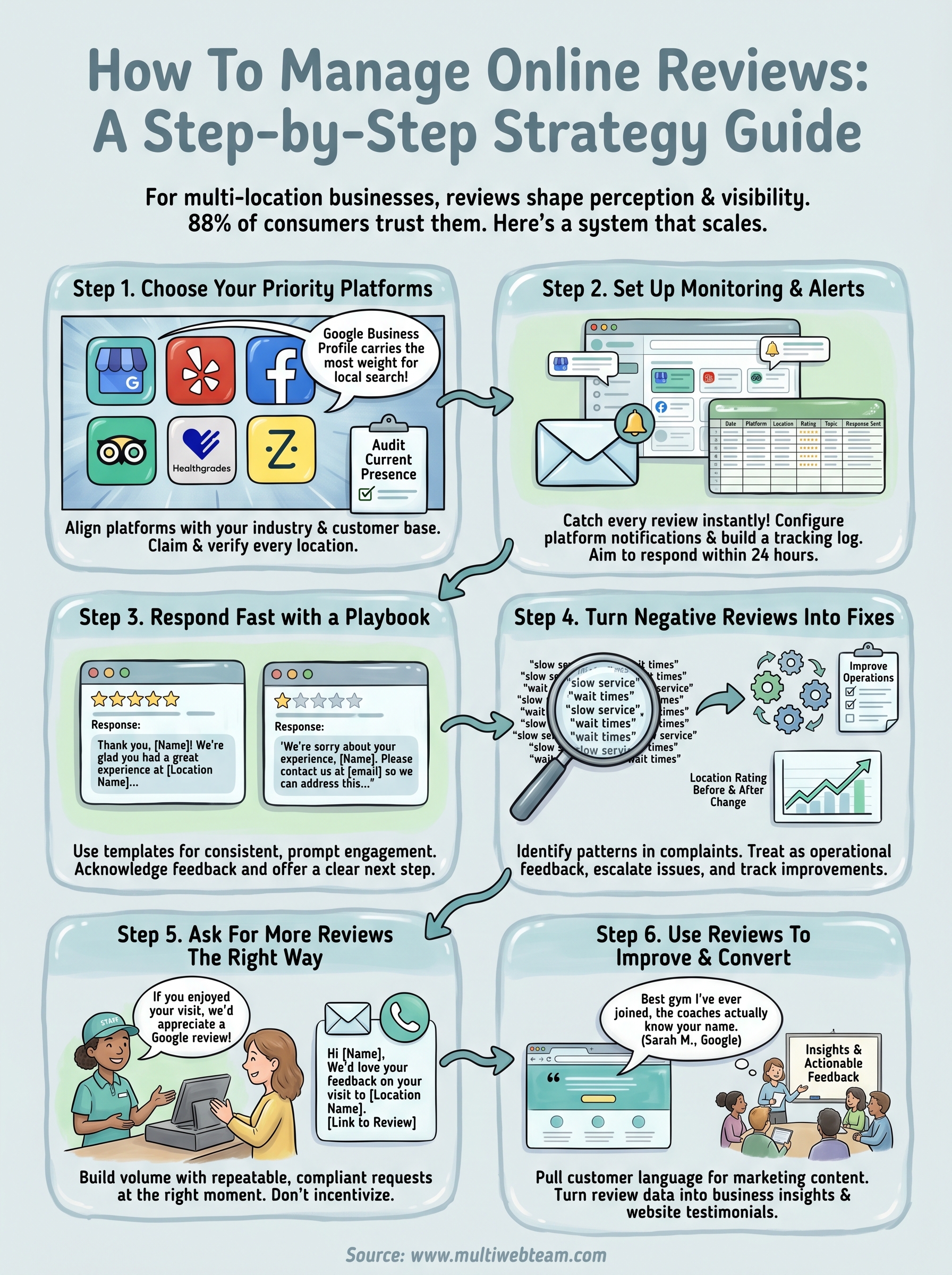
You now have a complete system for how to manage online reviews across every location your business operates. The six steps in this guide cover the full picture: choosing the right platforms , setting up alerts, building a response playbook, routing complaints into fixes, asking customers consistently, and turning feedback into content that converts. None of these steps require a large team or expensive software to get started.
Pick one step to implement this week rather than trying to tackle everything at once. Claiming and verifying your Google Business Profile listings across all your locations is the highest-leverage starting point if you haven't done that yet. From there, work through each step in order.
Multi-location businesses that combine strong review management with optimized location pages see the most consistent local search gains. If you want help building that foundation, see what Multi Web Team does for multi-location businesses.










