
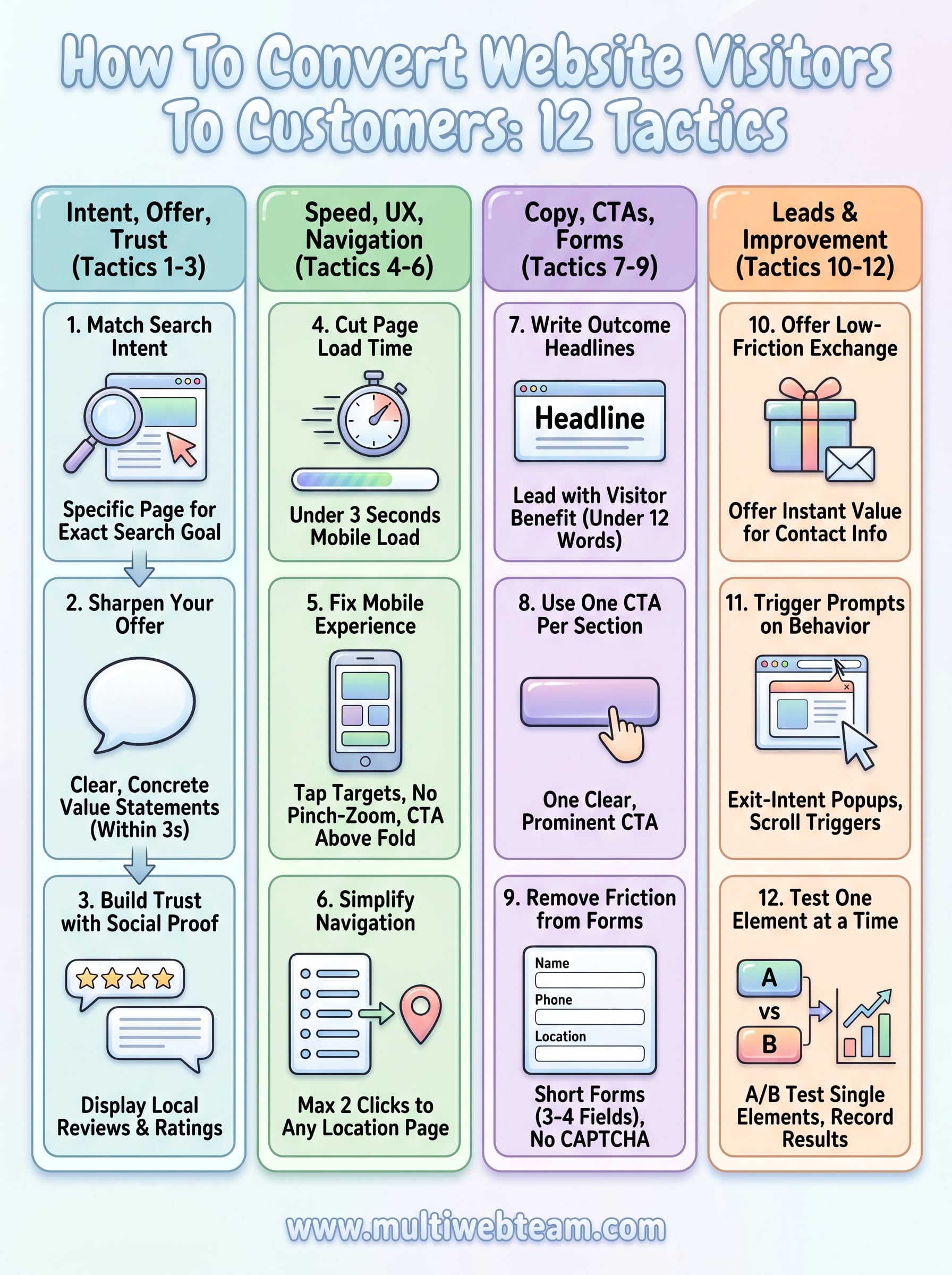

How To Convert Website Visitors To Customers: 12 Tactics
Getting traffic to your website is only half the job. The other half, the half that actually pays the bills, is figuring out how to convert website visitors to customers . And for multi-location businesses and franchises, this challenge multiplies with every new location you add. Each page needs to do real work: capture attention, build trust, and move people toward action .
The good news is that conversion isn't a mystery. It comes down to specific, repeatable tactics, things like clearer calls to action, faster load times, and smarter page layouts. Small changes often produce outsized results when you know where to focus. The problem is that most business owners are too busy running operations to test and refine their websites on a regular basis. That's exactly why we built Multi Web Team: to handle the ongoing optimization and management that keeps multi-location websites performing.
In this guide, we'll walk through 12 proven tactics you can apply to turn more of your existing traffic into paying customers, no guesswork required.
What counts as a conversion and how to measure it
A conversion is any action a visitor takes that moves them closer to becoming a customer. When you're thinking about how to convert website visitors to customers , the first step is getting clear on what "converted" actually means for your business. Not every site has the same goal , and treating all conversions the same way leads to tracking the wrong things and optimizing for the wrong outcomes. A restaurant chain measuring success by newsletter signups is solving a different problem than a fitness franchise tracking free trial bookings.
Defining your conversions before you build or update any page is the single most important step in any conversion strategy.
Types of conversions your site should track
Conversions fall into two broad categories: macro conversions and micro conversions . Macro conversions are your primary business goals, things like a phone call from a location page, a completed contact form, an online order, or a booked appointment. Micro conversions are smaller signals of intent, like clicking your phone number, watching a video, or spending more than two minutes on a service page. Both matter, and tracking both gives you a clearer picture of exactly where visitors drop off before committing.
Here are the most common conversion types for multi-location businesses:
| Conversion Type | Category | Example |
|---|---|---|
| Phone call from location page | Macro | Tap-to-call on mobile |
| Contact form submission | Macro | Quote or appointment request |
| Online order or booking | Macro | Checkout completed |
| Click-to-call event | Micro | Button click, no call placed |
| Direction request | Micro | "Get directions" map tap |
| Email signup | Micro | Promotional list opt-in |
How to set up conversion tracking
Google Analytics 4 lets you define custom events and mark them as conversions directly inside the platform. For a multi-location business, you'll want to create separate conversion goals per location page so you can identify which locations underperform and which pages drive the most action. Connect your Google Ads account if you run paid campaigns so you can see which ads drive real conversions, not just clicks.
For phone calls specifically, use dynamic number insertion on each location page. This technique swaps the displayed phone number based on the traffic source, telling you whether a call came from organic search, a paid ad, or a direct visit, without changing the number a customer saves in their contacts. Even small businesses can set this up through Google's call reporting tools inside Google Ads.
Tactics 1–3: match intent, sharpen offer, build trust
The first three tactics address the fundamentals of how to convert website visitors to customers : giving people what they came for, making your offer obvious , and proving you're worth their trust. Get these three right and every other tactic you apply will perform better because you're working with visitors who are already engaged.
Tactic 1: Match your page content to search intent
Every page on your site should directly reflect why a visitor landed there . If someone searches "pizza delivery near downtown Austin" and lands on your homepage instead of a location-specific page, you've already lost them. Map each major landing page to a specific intent , whether that's finding a location, comparing services, or placing an order, and make sure the headline and opening paragraph confirm they're in the right place within the first few seconds.
Tactic 2: Sharpen your offer
Your offer needs to be clear and specific within three seconds of a visitor loading the page. Vague language like "quality service" tells people nothing. Replace it with concrete value statements: "Free estimate within 24 hours" or "Locations open 7 days a week, no appointment needed." One strong, specific offer beats a list of generic benefits every time.
The most common conversion killer is a page that makes visitors think too hard about what you actually do.
Tactic 3: Build trust with social proof
Display reviews, ratings, and testimonials as close to your call to action as possible, not buried in a separate tab. For multi-location businesses, show location-specific reviews on each location page so visitors see feedback from people in their own area, which makes the decision to contact you significantly easier.
Tactics 4–6: fix speed, mobile UX, and navigation
Technical friction kills conversions before visitors even read your offer. Slow pages, broken mobile layouts, and confusing navigation are the three most common reasons visitors leave without taking action. Fixing these issues is a critical part of how to convert website visitors to customers at a consistent, scalable level across every location page you run.
Tactic 4: Cut page load time
Your pages need to load in under three seconds on a mobile connection, or you'll lose a large portion of visitors before they see anything. Use Google PageSpeed Insights to find your biggest bottlenecks. The most common fixes are:
- Compress images before uploading
- Remove unused JavaScript and CSS
- Enable browser caching
- Use a content delivery network (CDN)
A one-second delay in load time can reduce conversions by up to 7%, so speed improvements pay back quickly.
Apply these fixes to every location page, not just your homepage. Individual location pages drive the most local traffic , and a slow page there costs you real customers.
Tactic 5: Fix your mobile experience
More than half of local searches happen on mobile, so your tap targets, font sizes, and page layout need to work on a small screen without horizontal scrolling. Test every location page on a real phone, not just a desktop browser's responsive preview. Your click-to-call button should appear above the fold and be large enough to tap without zooming.
Tactic 6: Simplify navigation
Your visitors should reach any location page within two clicks from your homepage . Trim your navigation menu to five or six critical links. Remove social media icons and other exit links from the top of the page so visitors stay focused on your offer. Cluttered menus pull attention away from the one action you actually want people to take.
Tactics 7–9: write pages that sell with clear CTAs
Your page copy and calls to action (CTAs) are where understanding how to convert website visitors to customers becomes a writing exercise. Every headline, sentence, and button label either pushes visitors toward action or gives them a reason to leave. Weak copy costs you conversions even when your traffic, speed, and trust signals are solid.
Tactic 7: Write headlines that state the outcome
A headline should tell visitors exactly what they get , not what you do. Lead with the benefit the visitor walks away with , and keep the headline under 12 words so it reads cleanly on mobile. Here are two quick examples of the swap in practice:
- Weak: "Welcome to Our Fitness Centers"
- Strong: "Book a Free Trial Class at Any of Our 12 Locations Today"
The headline is the first thing visitors read and the fastest way to lose or keep them on your page.
Tactic 8: Use one CTA per page section
Every section of a location page should contain one primary CTA , such as "Book Now," "Call This Location," or "Get a Free Quote." Multiple competing buttons confuse visitors and reduce clicks across all of them. Place your CTA button in a high-contrast color that stands apart from the rest of the page, and repeat it at least twice per page: once above the fold and once after your key selling points.
Tactic 9: Remove friction from your contact forms
Short forms outperform long ones on every metric. Limit your form to three or four fields and use this clean template as a starting point:
Name: _______________
Phone: ______________
Preferred Location: ______________
Message (optional): ______________
[ Submit ]
Remove CAPTCHA from lead forms unless spam volume forces you to add it back. Every extra step drops your submission rate , so keep your form as frictionless as possible.
Tactics 10–12: capture leads and keep improving
Even when visitors are not ready to buy on their first visit, you can still capture them and bring them back. The final three tactics focus on building your lead pipeline and continuously improving results so your conversions compound over time rather than flatten out.
Tactic 10: Offer something low-friction in exchange for contact info
Not every visitor will call or book immediately. Give them a reason to share their email by offering something instantly useful , like a location-specific discount or a free consultation. Keep the opt-in prompt short and direct:
Get 10% off your first visit.
Enter your email: _______________
[ Claim Offer ]
Place this offer on your highest-traffic location pages and follow up with a short email sequence that nudges visitors back toward a booking.
Tactic 11: Trigger prompts based on scroll or exit behavior
Exit-intent popups and scroll-triggered banners reach visitors at the moment they are about to leave. Set a scroll trigger at 70% of the page depth to display a secondary CTA, or fire a popup when the cursor moves toward the browser bar. Keep the message specific to the page they are leaving , not a generic sitewide offer.
Triggered prompts consistently outperform static sidebar banners because they appear at the exact moment a visitor's attention is highest.
Tactic 12: Test one element at a time and record results
Understanding how to convert website visitors to customers is an ongoing process, not a one-time project. Run A/B tests on one page element at a time , such as your headline, button label, or form length, and give each test at least two weeks of data. Log every result in a simple tracker:
| Element Tested | Variant A | Variant B | Winner |
|---|---|---|---|
| CTA label | "Contact Us" | "Book Free Visit" | Variant B (+18%) |
| Headline style | Feature-led | Benefit-led | Variant B (+11%) |
Document every outcome so you build a knowledge base that informs future decisions across all your location pages.
Next steps
You now have 12 concrete tactics for how to convert website visitors to customers, from matching search intent to running structured A/B tests. The most important move you can make right now is to pick two or three tactics from this guide and apply them to your highest-traffic location page before touching anything else. Start with intent matching, page speed, and your primary CTA , since those three areas produce the biggest gains for the least effort.
Once you see results on one page, replicate the same fixes across every location in your portfolio. Consistency across all your location pages is what turns individual wins into a business-wide improvement. Managing that process takes real time and attention, which is where having a dedicated team makes the difference.
If you want a dedicated web team that handles ongoing updates, SEO, and optimization for every location you run, see what Multi Web Team can do for your business.










